
A VAT calculator adds value-added tax to a net price or works out how much VAT is inside a price that already includes it. Formula: Add: VAT = amount x rate/100; gross = amount + VAT; net = amount. Extract: gross = amount; net = amount / (1 + rate/100); VAT = gross – net. £100 plus 20% VAT is £120, and £120 including 20% VAT contains £20 of VAT.
On this page
How to use the vat calculator
- Enter the amount.
- Enter the VAT rate as a percentage.
- Choose add VAT or extract VAT.
- Read the net, VAT and gross amounts.
How the VAT calculator works
The VAT calculator has two modes. In add mode it treats your amount as the net price before VAT: VAT = net × rate ÷ 100, and gross = net + VAT. In extract mode it treats your amount as a gross price that already includes VAT: net = gross ÷ (1 + rate ÷ 100), and VAT = gross − net. The result in add mode is the gross price; in extract mode it is the net price, and both modes show all three figures.
VAT calculator worked example
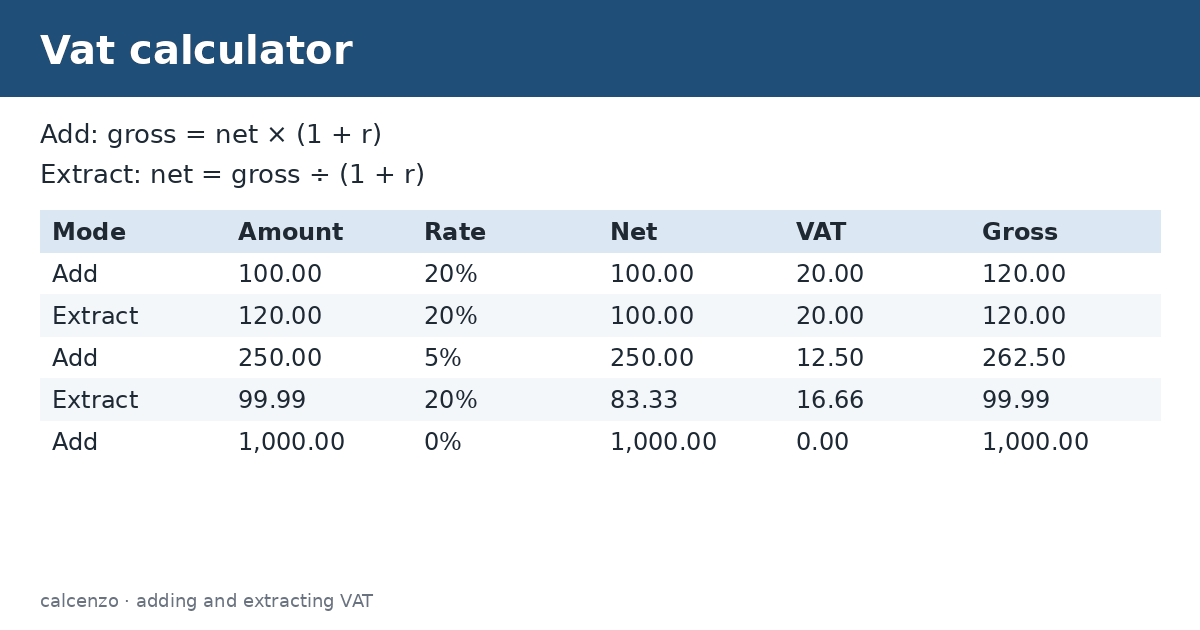
A UK supplier quotes £100 before VAT at the standard rate of 20%. The VAT calculator adds £20 and shows a gross price of £120. A receipt for £99.99 including 20% VAT contains £16.66 of VAT on a net amount of £83.33. Note that you cannot extract VAT by taking 20% of the gross price: 20% of £120 is £24, not £20. The right fraction for a 20% rate is one sixth of the gross.
| Mode | Amount | Rate | Net | VAT | Gross |
|---|---|---|---|---|---|
| Add | 100.00 | 20% | 100.00 | 20.00 | 120.00 |
| Extract | 120.00 | 20% | 100.00 | 20.00 | 120.00 |
| Add | 250.00 | 5% | 250.00 | 12.50 | 262.50 |
| Extract | 99.99 | 20% | 83.33 | 16.66 | 99.99 |
| Add | 1,000.00 | 0% | 1,000.00 | 0.00 | 1,000.00 |
UK VAT rates
According to GOV.UK, the UK standard rate is 20%, which applies to most goods and services. A reduced rate of 5% applies to some items, such as domestic energy and children’s car seats, and a zero rate applies to most food and children’s clothes. Some items are exempt or outside the scope of VAT altogether, which is different from zero-rated. Check the rate for your specific goods before you invoice.
EU VAT rates
Under the EU VAT Directive, each member state sets its own rates, but the standard rate must be at least 15%, and countries may apply up to two reduced rates of at least 5% to listed goods and services, with some special exceptions. The European Commission publishes the current rates by country. Enter the rate that applies to your sale; the VAT calculator does not look rates up for you.
VAT on invoices
A VAT invoice normally shows the net amount, the VAT rate, the VAT amount and the total. Rounding rules vary: some businesses round VAT per line and some per invoice, which can create a one-penny difference. The tool rounds the displayed money values to two decimal places, so check against the method your accounting software uses.
VAT versus US sales tax
VAT is charged at each stage of production and distribution, with businesses reclaiming the VAT they paid on inputs, so the final consumer bears the tax. US sales tax is charged once at the retail sale. Prices shown to consumers in the UK and EU usually include VAT, while US shelf prices usually exclude sales tax. For US purchases use a sales tax tool instead of a VAT calculator.
Common VAT calculator mistakes
The most frequent error is taking the VAT rate of a gross price instead of dividing. Another is applying VAT twice, for example adding VAT to a figure that already includes it. Check whether a price is quoted net or gross before you start, and choose the matching mode in the VAT calculator. Discounts should normally be applied before VAT is calculated, so the VAT falls with the discounted price.
Tips
- Use extract mode for receipts and shelf prices that include VAT.
- Use add mode for quotes and wholesale prices.
- Enter the rate as a percentage, such as 20, not 0.2.
- Keep VAT records as your tax authority requires.
Estimates for education only, not financial advice. Your lender’s figures are final.
Related converters and calculators
Related calculators:
- Sales tax calculator: US sales tax
- GST calculator: GST
- Percentage calculator: percentages
- Margin calculator: pricing
Sources
GOV.UK: VAT rates; European Commission: VAT rates.
Formula and method
Add: VAT = amount x rate/100; gross = amount + VAT; net = amount. Extract: gross = amount; net = amount / (1 + rate/100); VAT = gross - net.
Single-rate consumption tax arithmetic for add or extract modes. Not a filing engine.
Questions about this calculator
How do I add 20% VAT?
Multiply the net price by 1.2.
How do I remove 20% VAT?
Divide the gross price by 1.2; the VAT is one sixth of the gross.
What is the UK standard VAT rate?
20%.
What is the minimum EU standard rate?
15%.
Is VAT the same as sales tax?
No; VAT is collected at each stage and usually included in prices.
Check the assumptions and units before relying on a result. Financial, tax and health estimates do not replace advice for your individual circumstances.
Report a calculation issue