
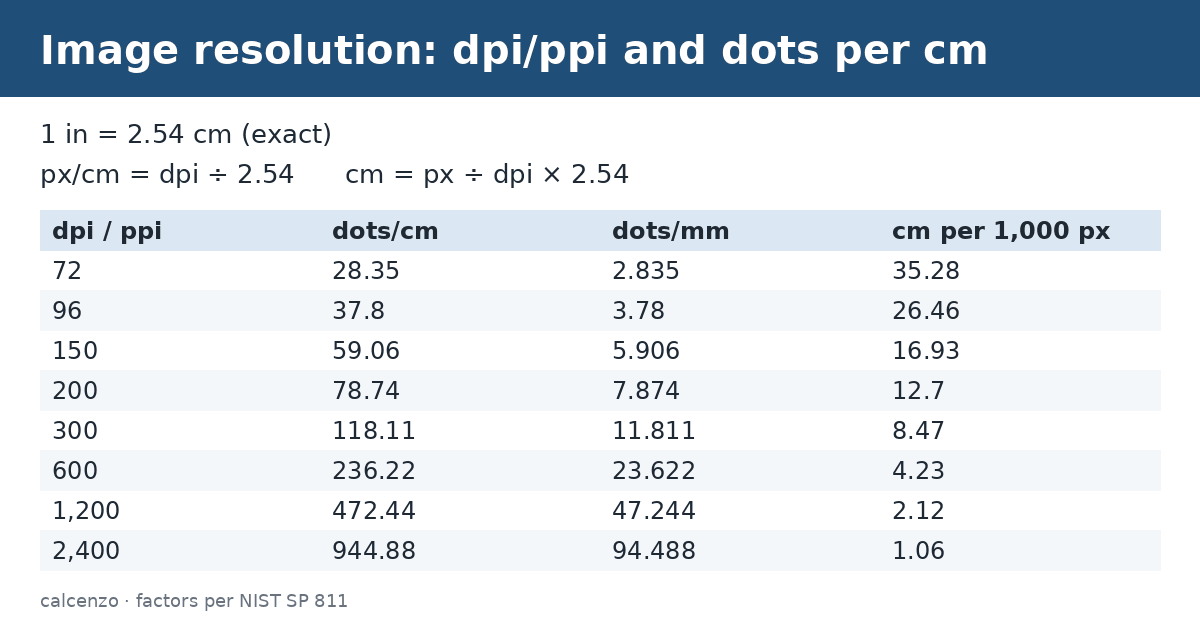
This image resolution unit converter changes print and screen resolution between dots or pixels per inch (dpi, ppi), dots per centimeter, dots per millimeter and dots per meter. Because 1 inch is exactly 2.54 cm, dpi to pixels per cm is a division by 2.54: 300 dpi = 118.11 px/cm.
On this page
How to use the image resolution unit converter
- Enter the resolution, for example 300 dpi.
- In the image resolution unit converter, choose its unit and the target unit, such as dpi to dots per cm.
- Read the image resolution unit converter result: 300 dpi ≈ 118.11 dots/cm.
For ppi to pixels per cm, divide by 2.54; for pixels per cm to ppi, multiply by 2.54. DPI and PPI convert the same way.
What is image resolution?
Image resolution describes how many pixels or printed dots fit in a length. PPI (pixels per inch) applies to screens and digital images, and DPI (dots per inch) to printers. 300 PPI is a common target for photo-quality prints.
Conversion formula
The image resolution unit converter stores every unit as a multiple of the base unit, the dot per meter (dpm). To convert:
value in target unit = value × (factor of source unit ÷ factor of target unit)
where each factor is the size of the unit in dots per meter.
Common image resolution conversions
| From | To | 1 unit equals |
|---|---|---|
| pixels per inch (ppi) | dots per inch (dpi) | 1 dpi |
| pixels per inch (ppi) | dot per centimeter (dpcm) | 0.3937008 dpcm |
| dots per inch (dpi) | dot per meter (dpm) | 39.37008 dpm |
| dot per centimeter (dpcm) | pixels per inch (ppi) | 2.54 ppi |
Image resolution unit converter worked example
Convert 25 pixels per inch to dots per inch:
- Factor of ppi = 39.370079 dpm
- Factor of dpi = 39.370079 dpm
- 25 × 39.370079 ÷ 39.370079 = 25 dpi
Image resolution unit reference
| Unit | Symbol | Group | Equals (dpm) |
|---|---|---|---|
| Dot per Meter | dpm | Metric | 1 |
| Pixels per Inch (PPI) | ppi | Print/Digital | 39.37007874 |
| Dots per Inch (DPI) | dpi | Print/Digital | 39.37007874 |
| Dot per Centimeter | dpcm | Metric | 100 |
| Dot per Millimeter | dpmm | Metric | 1,000 |
Reverse factors for each image resolution unit
The reference table gives each unit in dot per meters. To go the other way, divide by that factor; the list below does the division for you.
- Pixels per Inch (PPI) (ppi), Print/Digital: 1 ppi = 39.37008 dpm, so 1 dpm = 0.0254 ppi.
- Dots per Inch (DPI) (dpi), Print/Digital: 1 dpi = 39.37008 dpm, so 1 dpm = 0.0254 dpi.
- Dot per Centimeter (dpcm), Metric: 1 dpcm = 100 dpm, so 1 dpm = 0.01 dpcm.
- Dot per Millimeter (dpmm), Metric: 1 dpmm = 1,000 dpm, so 1 dpm = 0.001 dpmm.
Pixels needed for common print sizes
Pixels = inches × ppi, and inches = cm ÷ 2.54. Photo labs commonly ask for about 300 ppi; 150 ppi is often acceptable for large prints viewed from farther away:
| Print size | Pixels at 300 ppi | Pixels at 150 ppi |
|---|---|---|
| 4 × 6 in | 1,200 × 1,800 | 600 × 900 |
| 5 × 7 in | 1,500 × 2,100 | 750 × 1,050 |
| 8 × 10 in | 2,400 × 3,000 | 1,200 × 1,500 |
| A4 (210 × 297 mm) | 2,480 × 3,508 | 1,240 × 1,754 |
| US Letter (8.5 × 11 in) | 2,550 × 3,300 | 1,275 × 1,650 |
An A4 page at 300 ppi needs about 2,480 × 3,508 pixels. Rounding to whole pixels is shown.
Pixels to centimeters at a given dpi
To find the printed size of an image, divide pixels by the resolution: cm = px ÷ dpi × 2.54. At 300 dpi, 1,200 px prints at 10.16 cm (4 in); at 96 ppi, the common screen reference, the same 1,200 px spans 31.75 cm. The pixel count of an image file never changes when you change its dpi setting; only the printed size does. Use the length converter for inches and centimeters.
How big can a photo print?
Divide the pixel dimensions by the print resolution. A 6,000 × 4,000 pixel photo at 300 ppi prints at 20 × 13.3 inches. At 150 ppi, which is fine for posters seen from a few meters, it can go to 40 × 26.7 inches. The image resolution unit converter changes 300 ppi into about 118 pixels per centimeter for metric print shops.
PPI describes pixels in the image or on a screen. DPI describes printer dots, and an inkjet uses many dots to render one pixel, so a “1,200 dpi” printer does not need a 1,200 ppi file. Most labs ask for 240 to 300 ppi.
Related converters and calculators
Related tools:
- Length converter: m, ft, in
- Area converter: m² and ft²
- Luminance converter: nits and fL
- Illuminance converter: lux and fc
- Luminous intensity converter: cd and mcd
Sources
NIST Special Publication 811, Appendix B; BIPM: SI Brochure.
Questions about this calculator
How do I convert dpi to pixels per cm?
Divide by 2.54. For example, 300 dpi ≈ 118.11 px/cm.
How do I convert pixels per cm to ppi?
Multiply by 2.54. For example, 100 px/cm = 254 ppi.
Are dpi and ppi the same?
They convert identically, but dpi describes printer dots and ppi describes image or screen pixels.
How many pixels is 10 cm at 300 dpi?
10 ÷ 2.54 × 300 ≈ 1,181 pixels.
How many pixels does an A4 print need at 300 ppi?
About 2,480 × 3,508 pixels.
Check the assumptions and units before relying on a result. Financial, tax and health estimates do not replace advice for your individual circumstances.
Report a calculation issue