
How to use the AASA validator
- Paste the association JSON, or choose a
.jsonor.txtcopy of the file. - Select Process files. Use Try an example to inspect a minimal fictional app association.
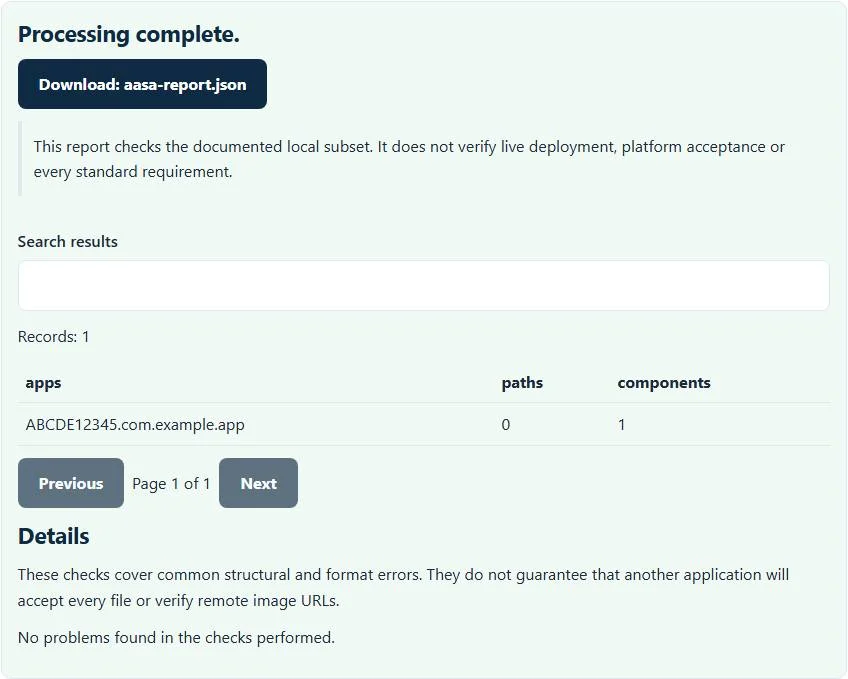
- Review the app identifiers, path/component counts and any diagnostics.
- Download
aasa-report.jsonwhen you need to retain the local preflight findings.
For this chooser, a saved copy can use a JSON extension. Deployment is a separate step: Apple’s actual association filename is apple-app-site-association, without an extension. Do not confuse the checker’s report file with the association document you serve.
Which association data is checked?
The supported input needs a nonempty applinks.details array. Each details entry is checked for app identifiers and either paths or components rules. App identifiers must have the supported ten-character prefix and a bundle identifier. The checker accepts the modern appIDs array and the supported single appID form.
Paths must be string entries. Components need supported URL path, query or fragment selectors, with a boolean exclusion flag when supplied. These are shape checks, not a full simulation of every matching rule. The AASA validator does not validate all associated-domain services, so it should not be used as comprehensive certification of web credentials, App Clips or unrelated AASA sections.
Example: associate article paths with an app
{
  "applinks": {
    "details": [{
      "appIDs": ["ABCDE12345.com.example.app"],
      "components": [{"/": "/articles/*"}]
    }]
  }
}
The example declares one app identifier and one components entry for an article-path pattern. The preview shows those declared counts; it does not open a URL or prove that the bundle identifier belongs to an installed application. Replace the fictional prefix and bundle ID with the identifiers required by your own app configuration.
A typo such as a string-valued exclusion flag can be diagnosed locally. A correctly shaped but unintended path pattern can still pass this subset, so test representative included and excluded links separately.
A local JSON pass is not a Universal Links deployment test
Association depends on more than document syntax. Apple’s associated-domains documentation explains the relationship between the served file and the app’s entitlement. This AASA validator does not inspect that entitlement or compare it with your domains.
It also does not check HTTPS response headers, redirects, MIME type, cache state or what Apple’s distribution infrastructure currently returns. A valid local document can coexist with a broken server response or an outdated installed app configuration. Keep the structural report separate from a deployment checklist and a real-device test.
Troubleshooting missing paths and components
A JSON syntax error prevents the rules from being read at all. Remove trailing commas, ensure property names and strings use double quotes, and verify that you pasted the JSON rather than an HTML error page. If a details array is missing or empty, add the actual supported app association structure.
A missing paths/components diagnostic means this checker cannot find a supported rule collection for the entry. Do not insert an arbitrary wildcard merely to remove the warning. Check which paths your app should handle and which should remain on the website. Duplicate-looking app entries may be intentional, but the local counts alone do not demonstrate a coherent rule strategy.
Test app and website configuration together
After fixing local findings, serve the intended file and test the exact domain and representative URLs in the appropriate Apple debugging workflow. Apple’s Universal Links debugging guidance covers checks beyond this local preflight. Differences between subdomains, build entitlements or installed versions can matter even when the JSON is unchanged.
For Android’s different website-to-app association file, use the assetlinks.json validator. It checks a different schema and cannot replace AASA checks. For a network log used during troubleshooting, the HAR sanitizer can remove much more request detail before you share it.
Review the report without exposing unnecessary project data
Processing is local; association JSON is not uploaded to a remote validator. The output report still names app identifiers and declared rules, so review it before posting it in a public issue. The checker never requests credentials, signing keys or a device connection.
Keep your authoring source under version control, compare the deployed document with the version you tested, and retain a few real-device test cases for important routes. Use the AASA validator to remove local structural mistakes first, then verify the infrastructure and app behavior that the browser preflight deliberately cannot observe.
Common AASA validator errors and how to fix them
When the AASA validator cannot use a file, it stops with one clear message instead of producing a half-finished download. These are the problems people run into most often, with the fix for each:
- AASA needs an applinks.details array. The JSON has no applinks object with a details array, or the array is empty.
- App identifier needs a 10-character prefix and bundle ID. Each appID or appIDs entry must look like ABCDE12345.com.example.app.
- Supply paths or components rules. A details entry has neither paths nor components, so it matches nothing.
- The file is not valid JSON. A trailing comma, comment or smart quote breaks JSON parsing.
Privacy: the AASA validator runs in your browser
AASA validator processing happens with JavaScript in a background worker on this page. Your file is not uploaded to a FileFix server, and the results you download are created in your browser’s memory. Configuration and network captures can expose tokens, hosts and internal paths, so local checking avoids another copy on someone else’s server. When you finish on a shared computer, clear the selection or close the tab.
Sources
The AASA validator follows these specifications and format guides:
Questions about this tool
Does this AASA validator check my live domain?
No. It inspects the JSON you provide. It does not fetch HTTPS headers, follow redirects, inspect Apple CDN responses or test deployed URLs.
Can a valid report guarantee that a link opens in my app?
No. Entitlements, deployment, installed-app state and actual URL matching require separate checks and device tests.
Should the deployed file have a .json extension?
Apple’s deployed association file is named apple-app-site-association without an extension. A .json copy is accepted here for local inspection only.
Are both appID and appIDs accepted?
The supported applinks profile accepts a single appID or an appIDs array, with identifiers checked against the implemented prefix-and-bundle-ID shape.
Does it validate every AASA service?
No. The implemented profile focuses on applinks details and supported paths/components structures, not every service or deployment requirement.
Review the supported formats and limitations before using an output file. File processing happens in your browser.