
A HAR sanitizer is useful before sharing a browser network log that may expose private URLs, tokens, cookies or response text. This HAR sanitizer uses a strict rebuild: it creates a new HAR-shaped log with a small allowed set of diagnostic fields, discarding request and response detail rather than searching for a few known secret names. Status codes, request methods and duration patterns remain useful for limited troubleshooting. The trade-off is substantial information loss, so review both privacy needs and the recipient’s debugging requirements.
How to use the HAR sanitizer
- Choose a
.haror.jsonnetwork-log file, or paste its JSON into the input. - Select Process files. Try an example uses a fictional request containing a token and private response text.
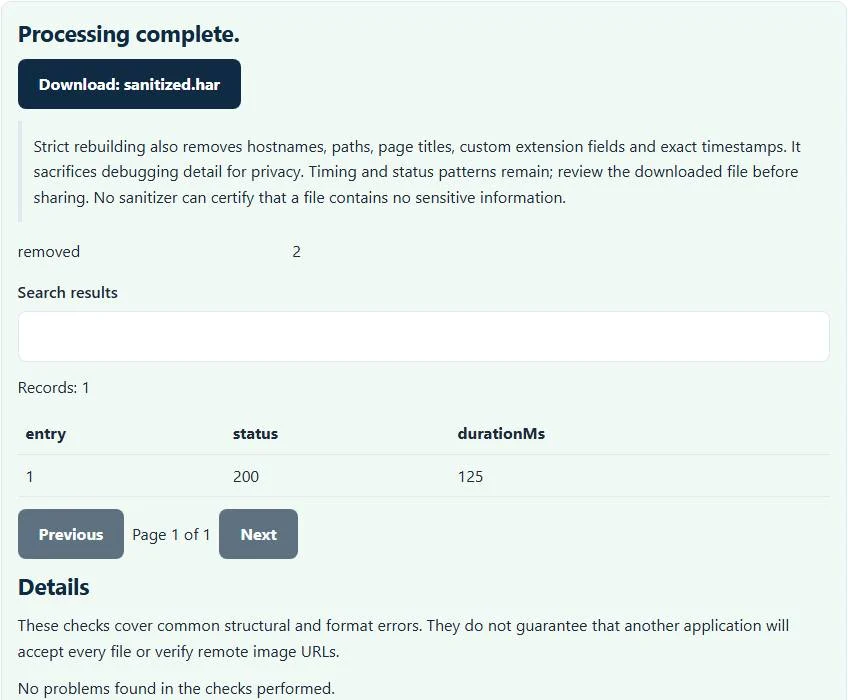
- Read the entry/status/duration preview and the reported removal count.
- Download
sanitized.harand inspect the actual file before sharing it.
The plugin does not upload the log or replay its requests. Keep the original in an appropriately protected location if your troubleshooting process still needs the details removed from the sanitized copy.
What is removed by the strict rebuild?
The HAR sanitizer discards original hostnames, URL paths, query strings, headers, cookies, post data, response bodies, page information and custom extension fields. Request URLs are replaced by a redacted placeholder. Original timestamps are replaced with a fixed synthetic value, so the output does not preserve the original chronology or absolute request times.
This is deliberately broader than deleting an Authorization header. Sensitive data can appear in many places, including response content and custom properties. Starting from an allowlist avoids carrying those unrecognized fields forward. It also removes details that a developer might normally use to understand endpoints, redirects, content types or payload errors.
Worked example: token-bearing request and private response
The example request has a URL resembling https://example.test/private?token=secret, an Authorization header and a private response body. Its sanitized entry uses a placeholder URL, empty header/cookie collections and no response text. The original response status 200 and total duration 125 milliseconds remain visible.
The output timings are reconstructed in a simplified form: the retained total duration is assigned to wait time, with send and receive set to zero. That makes the report useful for coarse duration/status patterns, not a faithful analysis of DNS, connection or transfer phases. Do not present the sanitized file as an exact copy of the original waterfall.
Why browser sanitized export is a separate first step
Chrome’s network export documentation describes a sanitized HAR option that excludes some sensitive headers. That browser export is helpful, but it is a different operation from this stricter local rebuilding. A header-cleaned file can still contain meaningful URLs or response detail that your sharing policy does not allow.
When possible, collect only the network activity needed for the issue and avoid capturing unrelated sessions. Then decide whether a heavily reduced log will answer the recipient’s question. This HAR sanitizer cannot certify that remaining patterns reveal nothing sensitive: unusual methods, statuses or durations may still be identifying in context.
Understand the debugging information you give up
Without real URLs and bodies, a support engineer cannot see which product request failed or inspect a server’s error message. Removed headers also prevent analysis of many cache, content negotiation and authentication details. Absolute timestamps and page labels are unavailable. The removal count is not a score proving completeness; several discarded fields are counted differently from a count of possible secrets.
Use a separate written explanation with non-sensitive reproduction steps when necessary. Never add a token back merely because a recipient asks for more context. If more detailed diagnostics are genuinely required, agree on a secure process and a minimum dataset rather than assuming any sanitized filename makes a file safe.
Related developer checks without network replay
For an association-file problem, use the AASA JSON validator or the assetlinks.json validator to inspect the supported local document shape. Those tools do not test the live deployment, but their reports can be more relevant than a heavily redacted HAR for a simple syntax mistake.
For a streaming-manifest issue, the HLS playlist validator checks a different local text format. It does not request the referenced segments. Choose a diagnostic artifact that matches the failure rather than disclosing a full browsing session when a small configuration sample is sufficient.
Troubleshooting and sharing the final copy
The input must be readable JSON with a log entries collection and usable request/response objects. Invalid status values or negative/non-finite durations are rejected. An empty or broken text export should be captured again instead of repaired by inventing requests. The HAR sanitizer never executes uploaded scripts or sends requests named in the log.
Open the downloaded HAR as text and confirm that the fields you intended to remove are absent. Keep the original and sanitized copies clearly distinguished. Processing remains in the browser, but download storage and later sharing are your separate decisions. Clear the page after confidential work and describe the retained diagnostic scope accurately.
Common HAR sanitizer errors and how to fix them
When the HAR sanitizer cannot use a file, it stops with one clear message instead of producing a half-finished download. These are the problems people run into most often, with the fix for each:
- The file is not valid JSON. The HAR file is truncated, which often happens when an export is interrupted.
- Expected a HAR log with valid request/response entries. log.entries is missing, an entry has no request or response, a URL is not http(s), or a status or time value is invalid.
- Debugging details missing after sanitizing The strict rebuild removes hosts, paths, headers, cookies, bodies and exact timestamps on purpose.
Privacy: the HAR sanitizer runs in your browser
HAR sanitizer processing happens with JavaScript in a background worker on this page. Your file is not uploaded to a FileFix server, and the results you download are created in your browser’s memory. Configuration and network captures can expose tokens, hosts and internal paths, so local checking avoids another copy on someone else’s server. When you finish on a shared computer, clear the selection or close the tab.
For the underlying format rules, see the W3C HTTP Archive (HAR) format draft. The HAR sanitizer follows the subset described on this page rather than every optional feature in those documents.
Sources
Questions about this tool
Does the HAR sanitizer only remove known token names?
No. It rebuilds entries from an allowlist and discards original URLs, headers, cookies, bodies and extension fields, rather than relying on a short list of secret names.
Are hostnames and paths preserved?
No. Request URLs become redacted placeholders; original hostnames, paths and query strings are discarded.
Does the result preserve the original network waterfall?
No. Absolute timestamps and detailed phase timings are removed or synthesized. Total duration and status patterns remain.
Can the tool guarantee that a shared log reveals nothing sensitive?
No. Remaining diagnostic patterns can still be sensitive in context. Inspect the downloaded file and share only what is necessary.
Does sanitizing a HAR replay its requests?
No. The tool parses and rebuilds local JSON. It does not contact the URLs recorded in the log.
Review the supported formats and limitations before using an output file. File processing happens in your browser.