
What the HLS validator checks locally
An HLS playlist is text containing descriptive tags and references to other playlists or media segments. A media playlist describes segments, while a master playlist advertises variant streams. Mixing those responsibilities can confuse a receiver even when every line appears readable on its own.
This preflight checks for the opening #EXTM3U header, supported tag-to-URI sequencing, positive EXTINF durations, a positive integer target duration for media playlists and a positive integer BANDWIDTH value for supported variant tags. It also flags unescaped whitespace in a URI and missing references after a segment or variant declaration.
Inspect your playlist file
- Choose a .m3u8 or .m3u file with Choose file, or paste the actual playlist text into the input.
- Select Process files after pasting. The example control loads a one-segment media playlist.
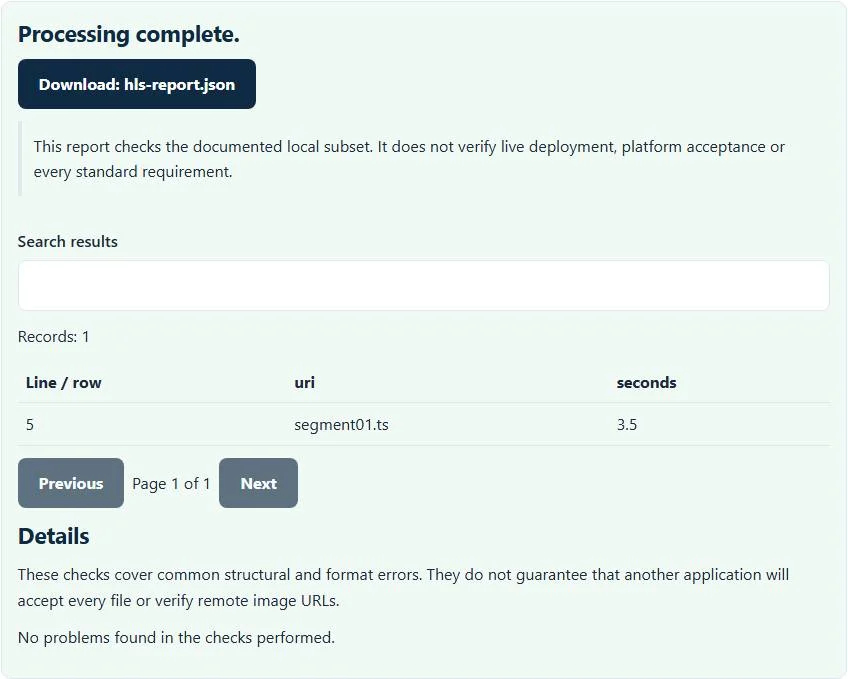
- Read the referenced URI table and diagnostic messages, which identify relevant source lines.
- Download
hls-report.jsonto keep the findings, edit the playlist source and check the next export.
File selection runs with the current input automatically. This interface accepts file contents rather than a streaming URL. Pasting https://example.test/live.m3u8 does not retrieve that document; copy a local export or obtain the text through your own authorized deployment workflow.
A media playlist example
#EXTM3U
#EXT-X-VERSION:3
#EXT-X-TARGETDURATION:4
#EXTINF:3.5,
segment01.ts
#EXT-X-ENDLIST
The example declares one segment with a duration of 3.5 seconds and a target duration of 4 seconds. Rounding 3.5 to the nearest integer yields 4, which fits that declared target. If the segment duration were changed to 4.6, its rounded value would be 5, and this checker would report that it exceeds the target.
Deleting segment01.ts leaves an EXTINF tag without its required following URI. Placing a bare filename before any supported segment or variant declaration also produces a sequencing diagnostic. These examples show text relationships, not media decoding: the actual file named segment01.ts is never opened.
Master variants and misleading clean reports
A supported master variant begins with an EXT-X-STREAM-INF declaration and points to a child playlist on a following URI line. The checker reads its BANDWIDTH field, but does not establish that the rendition bitrate matches it. It also does not fetch a child playlist to verify its own segment structure.
Relative references can be legitimate, but they will depend on the deployed playlist’s base URL. Absolute references can be perfectly shaped while returning an HTTP error. Neither reachability nor cross-origin response behavior is tested here. A clean text report should therefore be one step in debugging, followed by a real player and network inspection in the intended environment.
Unsupported checks and practical troubleshooting
Low-latency HLS, full RFC conformance, codecs, encryption behavior, media decodability, key availability and network headers are outside this basic preflight. It does not measure segment duration from media bytes, assess buffering or reproduce a DRM workflow. For comprehensive protocol expectations, consult RFC 8216 and the relevant current platform requirements.
If the opening header is missing, confirm the file is a playlist rather than a browser error page saved as .m3u8. If a duration is rejected, inspect the original numeric field rather than adding a larger target as a universal fix. The encoder and segmenter remain responsible for generating valid media and coherent timing.
For captions used alongside a web-video workflow, convert SRT to WebVTT separately; that does not validate an HLS rendition. When sharing a failed playback trace, sanitize the HAR capture before sending it because request URLs, credentials and responses can contain sensitive information. Keep the original trace restricted, and distinguish a playlist-text finding from a problem observed in real playback.
Common HLS validator errors and how to fix them
When the HLS validator cannot use a file, it stops with one clear message instead of producing a half-finished download. These are the problems people run into most often, with the fix for each. Most HLS validator errors trace back to how the source file was exported, so correcting the source and running the HLS validator again is usually faster than working around the message.
- HLS playlists must begin with #EXTM3U. The first line is missing or has a byte-order mark or HTML in front of it.
- Segment duration exceeds TARGETDURATION after rounding. A segment is longer than the declared target duration.
- URI is missing a preceding EXTINF or STREAM-INF tag. A media line is not described by the tag before it.
- Master and media tags are mixed. A multivariant playlist and a media playlist were combined in one file.
Privacy: the HLS validator runs in your browser
HLS validator processing happens with JavaScript in a background worker on this page. Your file is not uploaded to a FileFix server, and the results you download are created in your browser’s memory. Configuration and network captures can expose tokens, hosts and internal paths, so local checking avoids another copy on someone else’s server. When you finish with the HLS validator on a shared computer, clear the selection or close the tab.
Sources
Questions about this tool
Can I paste a stream URL to test playback?
No. The tool accepts local playlist contents and does not retrieve URLs or play a stream.
Are segment durations measured from the video?
No. The checker reads declared EXTINF values and compares their rounded values with the target duration; it does not decode segments.
Does it test encryption keys?
No. Key URLs, encrypted media and DRM workflows are not fetched or exercised.
Why does an EXTINF line need a following URI?
The tag describes a media segment. A supported sequence must include the corresponding segment reference, otherwise the playlist text is incomplete.
Does a clean report prove HLS compliance?
No. This is a limited structural preflight, with full conformance, deployed networking and playback outside its checks.
Review the supported formats and limitations before using an output file. File processing happens in your browser.