
The DMARC report analyzer turns supported aggregate feedback files into readable source-IP rows and a downloadable CSV. Choose XML, ZIP or gzip reports to inspect the reported domain, message counts, receiver disposition and SPF/DKIM alignment results. This helps when an attachment contains useful sending statistics but its XML is difficult to read. The reports are decompressed and parsed in your browser; the DMARC report analyzer does not perform DNS checks, collect future reports, examine forensic message bodies or decide whether an unfamiliar sender is legitimate.
How to use the DMARC report analyzer
Press Try an example to inspect the invented demonstration XML before selecting real infrastructure data. Use Choose file or drag in one or more supported .xml, .zip or .gz files. File selection starts processing automatically. ZIP input is searched for XML entries, and gzip XML is expanded locally before parsing.
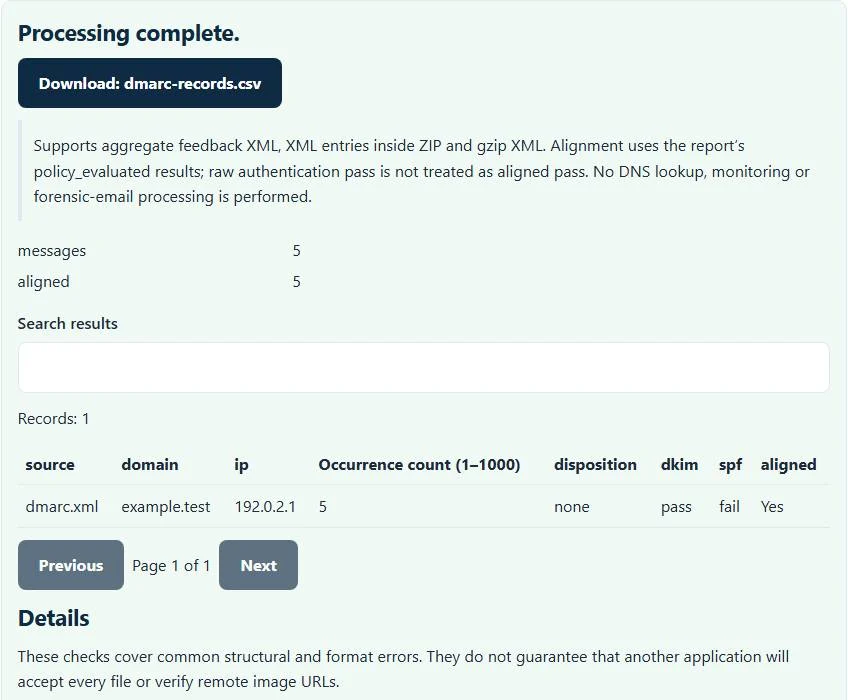
Read the table’s source filename, domain, IP, count, disposition, dkim, spf and aligned columns. The result also summarizes reported message volume and aligned message volume. Download dmarc-records.csv to filter or compare the rows in a spreadsheet. This interface works from selected report files; it does not have a live domain-check button or a mailbox connection.
Alignment and raw authentication pass are not identical
A reported SPF or DKIM authentication pass on its own does not necessarily establish DMARC alignment with the visible From domain. This DMARC report analyzer uses the SPF and DKIM values in the report’s policy_evaluated section for its aligned flag. It considers the row aligned when at least one of those reported alignment outcomes is pass.
The DMARC report analyzer does not recompute authentication from a saved email or reinterpret raw auth_results values as aligned passes. That distinction matters when a service signs with its own domain or forwards mail. A row failing one mechanism can still align through the other. Conversely, a technical authentication pass for an unrelated domain should not be treated as proof of alignment here.
Worked example: weight rows by their message counts
Suppose a fictional aggregate report contains one row with count 90, policy_evaluated DKIM pass and SPF fail, and another with count 10 that fails both. The first row is aligned through DKIM, so the summary shows 100 reported messages and 90 aligned messages. Counting one passed row out of two would incorrectly imply a 50 percent message result.
The same IP can appear in several rows with different outcomes. Keep those rows available instead of assuming every address has one universal status. The source filename column helps trace a row back to its selected attachment. The summary is a calculation over the supplied rows, not an independent estimate of all messages your domain sent.
Disposition tells a different part of the story
The disposition field records the receiver’s reported action, such as none, quarantine or reject. An action can reflect receiver handling and policy context; it is not a fresh instruction generated by this page. Investigate the domain, reporting period and source export before making a change to your published policy.
A clear alignment result does not prove the message content was harmless or the sender was intended. Likewise, an unfamiliar IP is not automatically evidence of abuse. Compare it with your authorized sending services and their configuration. This local analyzer does not enrich addresses, look up ownership, classify sending organizations or promise a recommended policy rollout.
Know the supported report profile and its limits
The parser reads supported aggregate feedback XML using traditional feedback, policy_published, record, row and policy_evaluated fields. It is not a complete XML Schema validator for every current report extension. Current aggregate-report documentation is RFC 9990; this page does not claim comprehensive conformance merely because common records can be summarized.
Reports with no readable record rows, invalid counts or malformed XML are rejected. Gzip expansion is bounded to 32 MiB, with integrity checks, and archive safety limits apply to ZIP input. Output is capped at 100,000 records. A small compressed attachment can expand substantially, so a compressed file fitting the visible per-file limit does not guarantee successful expansion.
Avoid double-counting when combining reports
Several selected files can be combined for export, but this implementation does not deduplicate overlapping reporting periods or repeated report identities. Selecting the same report twice can double its contribution. Check your report collection before interpreting a cross-file total, and keep receiver periods distinct when making comparisons over time.
A single email’s readable content belongs in the EML viewer; it is a different input from an aggregate report. Before sharing unrelated debugging traffic, the HAR sanitizer applies its supported allowlist removal to browser network logs. Neither tool verifies a DMARC policy. Handle the exported IP and domain statistics as operational data, retain a useful provenance trail, and clear this page’s selected files and results on a shared device.
Common DMARC report analyzer errors and how to fix them
When the DMARC report analyzer cannot use a file, it stops with one clear message instead of producing a half-finished download. These are the problems people run into most often, with the fix for each:
- Expected aggregate DMARC feedback records with positive message counts. The XML root is not feedback, or a record has no row or a zero count. Forensic (failure) reports and ordinary email do not qualify.
- The file does not match the expected format or has invalid structure. A .gz or .zip attachment is damaged or its checksum fails. Download the report again from the mailbox.
- The file or its expanded contents exceed the browser safety limit. Use a smaller file or split it first. A compressed report expands to more than 32 MB.
Privacy: the DMARC report analyzer runs in your browser
DMARC report analyzer processing happens with JavaScript in a background worker on this page. Your file is not uploaded to a FileFix server, and the results you download are created in your browser’s memory. Email often contains personal data and attachments, so it is useful that nothing leaves your device. When you finish on a shared computer, clear the selection or close the tab.
For the underlying format rules, see the RFC 7489 (DMARC). The DMARC report analyzer follows the subset described on this page rather than every optional feature in those documents.
Sources
The DMARC report analyzer follows these specifications and format guides:
Questions about this tool
Does the analyzer check my current DNS record?
No. It reads the selected aggregate report files. It does not fetch current SPF, DKIM or DMARC DNS settings.
Can a row pass DMARC when SPF fails?
Yes, when the report’s policy_evaluated DKIM result is aligned pass. This tool marks alignment when reported SPF or DKIM alignment passes.
Does it accept compressed report attachments?
Supported inputs include XML, XML entries in ZIP and gzip-compressed XML, subject to the displayed file and archive expansion limits.
Will selecting duplicate reports remove duplicate counts?
No. This implementation does not deduplicate report IDs or overlapping periods. Repeated inputs can inflate combined totals.
Can I read forensic failure emails here?
No. This analyzer summarizes supported aggregate feedback records. Forensic or failure-message processing is a separate scope.
Review the supported formats and limitations before using an output file. File processing happens in your browser.