
Build the CSV columns the converter actually reads
The header row needs question and answer. A type column distinguishes mcq from truefalse; omitted type values default to mcq. Multiple-choice rows use columns A, B, C and D. Supply between two and four choices, starting with A and without gaps. The answer cell contains the correct letter, rather than repeating the answer text.
For a true/false row, set type to truefalse and answer to true or false. Leave the A–D cells empty: the package supplies those two choices itself. Quote questions and choices containing commas so each remains one CSV cell. An answer that refers to a missing choice is an input error, not a request to create that choice automatically.
How to use the CSV to QTI converter
Enter a meaningful Quiz title, then choose your .csv file or paste its text into the available input. Selecting a file starts conversion; after pasting or changing the title, press Process files. Try an example loads an invented two-question quiz so you can inspect the required layout without exposing your own bank.
Check every preview row, including its question type, answer text and point value. Download quiz-qti12.zip only after the answer key matches your intention. The archive contains an IMS manifest and quiz XML. Keep it as a ZIP for the receiving import workflow; extracting and choosing a random inner XML file is not equivalent to importing the package.
Worked example: two supported question types
The multiple-choice example asks which number is even. Choices A–D are 3, 4, 5 and 7, so answer B gives 4 as the correct response. The second question is a true/false statement about water, with true as its keyed answer. Each item receives one point. This sample demonstrates the format and scoring model, not an automatically generated lesson or a reviewed assessment.
question,type,A,B,C,D,answer
Which number is even?,mcq,3,4,5,7,B
Water contains hydrogen.,truefalse,,,,,true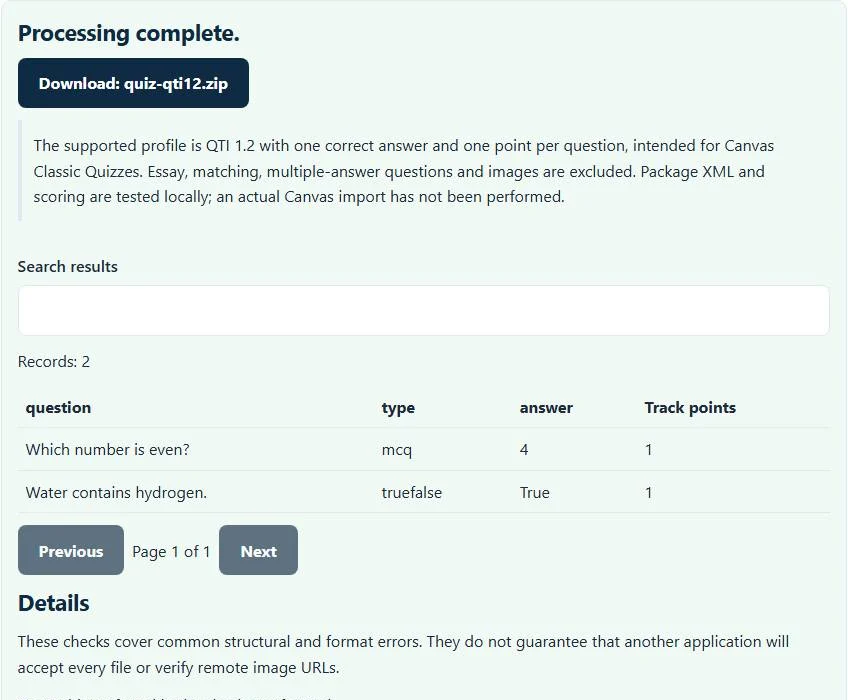
What QTI 1.2 output means for an LMS import
QTI is an assessment interchange format, while CSV is only a table. Creating a package supplies item structure, answer identifiers and score processing that a spreadsheet lacks. This CSV to QTI converter emits the QTI 1.2 profile intended for Canvas Classic Quizzes. Canvas documentation confirms that Classic quiz exports use QTI 1.2, but a matching format label alone does not prove this particular package has passed an actual course import.
Use your institution’s current import instructions and a disposable course or practice quiz. Check the imported item count, question wording, correct answer, score and any punctuation or Unicode characters. LMS versions and quiz engines can interpret import packages differently. Do not assume a successful XML check is evidence for every Canvas New Quizzes path, Moodle importer or another platform.
Question types, scoring and media that are outside this scope
Essay, matching, multiple-answer questions, question images and variable item points are not supported here. Text is emitted as text rather than executable HTML. If a question depends on a diagram, convert its question bank using a workflow that deliberately packages and references media; putting an image URL into a choice does not add an image feature.
The CSV to QTI converter permits at most 5,000 questions and enforces consistent CSV row width. A small test quiz is easier to review than a full course bank, even when the file-size limit allows the larger input. Maintain the source spreadsheet and a separately reviewed answer key. Conversion checks structure and scoring representation; it does not decide whether a question is educationally valid or factually correct.
Fix encoding and keep separate learning-package checks separate
If punctuation or accented names were damaged when the CSV was exported, use the CSV encoding converter to inspect and save suitable UTF-8 text before building the quiz. A SCORM course package solves a different problem from a QTI question bank; the SCORM validator can check its own supported manifest and launch-file structure. Neither tool uploads a course, logs in to your LMS or runs a learning activity. Use the QTI download as a reviewed starting package and test the receiving system before assigning it to students.
Common CSV to QTI converter errors and how to fix them
When the CSV to QTI converter cannot use a file, it stops with one clear message instead of producing a half-finished download. These are the problems people run into most often, with the fix for each. Most CSV to QTI converter errors trace back to how the source file was exported, so correcting the source and running the CSV to QTI converter again is usually faster than working around the message.
- A required field or column is missing. The header needs at least question and answer columns, and every row needs question text.
- Only multiple-choice (mcq) and truefalse questions are supported. The type column contains another value, such as essay or matching.
- Provide consecutive A–D choices and one valid answer key. Choices must fill A, B, C and D in order without gaps, and the answer must name one of them. For truefalse rows the answer is True or False.
- The file contains too many records for this browser tool. A quiz can contain up to 5,000 questions.
Privacy: the CSV to QTI converter runs in your browser
CSV to QTI converter processing happens with JavaScript in a background worker on this page. Your file is not uploaded to a FileFix server, and the results you download are created in your browser’s memory. Unpublished manuscripts, designs and product data stay on your computer. When you finish on a shared computer, clear the selection or close the tab.
For the underlying format rules, see the 1EdTech Question and Test Interoperability (QTI) and RFC 4180 (CSV). The CSV to QTI converter follows the subset described on this page rather than every optional feature in those documents.
Sources
Questions about this tool
Can I upload a Word document or PDF question bank?
No. This implementation accepts the supported CSV columns. It does not extract questions from Word or PDF files.
Can one question have several correct answers?
No. Each multiple-choice item has one correct answer. Multiple-answer scoring needs a different QTI authoring workflow.
How many points does each generated question receive?
Each item is represented as a one-point question. This interface does not offer custom point values.
Has the package been imported into Canvas?
Its XML, package layout and scoring have been tested locally. An actual Canvas import has not been performed; test a small quiz in your own receiving environment.
Why are A and C present but my row is rejected?
Multiple-choice columns must be consecutive from A. Supply A and B for two choices, or A, B and C for three; gaps make letter-to-choice mapping ambiguous.
Review the supported formats and limitations before using an output file. File processing happens in your browser.