
How to use the SCORM validator
- Choose the course
.zipexport you intend to inspect. - Select Process files, or use Try an example for a small packaged course sample.
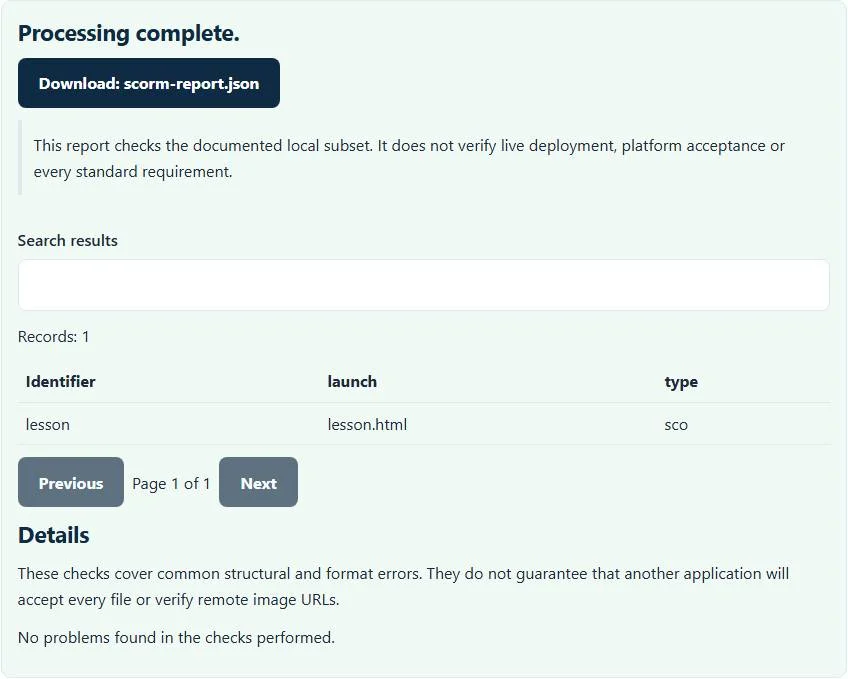
- Review the resource IDs, launch paths and reported package findings.
- Download
scorm-report.json, correct the authoring/export source, and check a fresh ZIP.
The SCORM validator opens the archive as data and reads the manifest. It does not execute the included HTML or JavaScript, connect to an LMS or make course-completion requests. Keep the original package before making any packaging changes.
What the manifest and resource checks cover
The archive must contain imsmanifest.xml at its root, and the parsed document must have a manifest root. Resource identifiers must be present and unique within the checked resource set. The SCORM validator inspects resource launch references, supported listed files and organization item references to declared resource identifiers.
A local launch path should identify a file actually present in the ZIP. Declared file resources are checked for existence. A manifest entry that points to a missing resource can explain a blank or failed launch, but simply finding a file does not prove that its own scripts and embedded assets work. The checker is focused on package links, not full dependency discovery or course execution.
Example: a course folder is zipped one level too deep
A common packaging mistake produces these archive entries:
MyCourse/imsmanifest.xml
MyCourse/index.html
The root manifest expected by this preflight is absent, even though a similarly named file is inside the folder. A correctly prepared package would expose imsmanifest.xml and its declared launch resources at the intended archive-relative paths. Re-export through the authoring tool or package the intended contents rather than blindly changing references.
Another useful test is a manifest launch value of lesson.html with no such file in the archive. The SCORM validator reports the missing local launch file. It does not substitute index.html merely because that filename looks likely.
SCORM packaging and runtime compliance are different
The preflight does not provide a learning-management system, test score reporting or simulate learner progress. It also does not validate every SCORM schema, sequencing rule or version-specific runtime requirement. A structurally coherent package can still fail to locate an LMS API or fail to record completion.
Moodle’s SCORM troubleshooting guidance explains the importance of manifest paths and the package’s real files. Use the actual supported LMS/version to test launch, bookmarking, completion, score and resume behavior. The report is not a SCORM compliance certificate or a compatibility guarantee for every LMS.
Remote resources and path resolution limits
Remote HTTP(S) launch resources are not fetched and are reported as outside local checking. This implementation does not resolve every xml:base arrangement or advanced dependency convention. Relative references containing unsupported traversal can also be rejected instead of followed outside the intended local profile.
Check exact filename spelling and case in the authoring source, especially when moving between systems with different filesystem behavior. A resource that happens to launch on one desktop setup may still fail in the hosted LMS. Do not assume a clean archive-level result verifies all links embedded inside HTML, CSS or JavaScript.
Choose a related preflight for the actual deliverable
For a question bank rather than an interactive course, the CSV to QTI converter generates a separate supported quiz package. QTI interchange and SCORM course tracking are different workflows. This SCORM checker does not turn one package type into the other.
For translated course strings, the XLIFF validator checks a local translation-document subset. If you collect a network log while testing the deployed course, the HAR sanitizer removes detailed request data before limited sharing. Pick the smallest relevant artifact rather than exposing unrelated learner or course information.
Troubleshooting and completing course QA
A broken ZIP, missing root manifest or invalid XML can stop inspection early. Duplicate resource IDs and unknown organization references require source corrections, not repeated uploads of the same file. Verify that an export is genuinely a SCORM-oriented package rather than a generic website ZIP, xAPI package or another learning standard.
Archive expansion safety limits apply as well as the displayed file-size limit. Large video assets can exceed browser resources even when the ZIP is moderately sized. After correcting package findings, test the course in the intended LMS with representative learner actions. Processing stays local here; publication, learner tracking and platform compliance remain separate verification steps.
Common SCORM validator errors and how to fix them
When the SCORM validator cannot use a file, it stops with one clear message instead of producing a half-finished download. These are the problems people run into most often, with the fix for each. Most SCORM validator errors trace back to how the source file was exported, so correcting the source and running the SCORM validator again is usually faster than working around the message.
- The ZIP needs a valid imsmanifest.xml at its root. The course was zipped one folder too deep, or the manifest is not valid XML.
- Local launch file is missing A resource href points to a file that is not in the ZIP.
- Organization references unknown resource. An item identifierref does not match any resource identifier.
- Remote launch URI is not checked. External launch URLs are reported as warnings, not fetched.
Privacy: the SCORM validator runs in your browser
SCORM validator processing happens with JavaScript in a background worker on this page. Your file is not uploaded to a FileFix server, and the results you download are created in your browser’s memory. Configuration and network captures can expose tokens, hosts and internal paths, so local checking avoids another copy on someone else’s server. When you finish on a shared computer, clear the selection or close the tab.
Sources
Questions about this tool
Why must imsmanifest.xml be at the ZIP root?
This preflight looks for the course manifest at the archive root. A manifest inside an extra enclosing folder commonly causes LMS package-import failures.
Does the SCORM validator launch my course?
No. It reads archive and manifest data without executing course HTML or JavaScript.
Does it test completion and score tracking?
No. Runtime API behavior, learner state, scores, bookmarking and sequencing need testing in an appropriate LMS.
Are remote launch files checked?
No. Remote resources are not fetched. The report identifies them as outside the supported local resource check.
Does a clean report certify SCORM compliance?
No. This is a package-and-link preflight, not full schema, sequencing, runtime or platform certification.
Review the supported formats and limitations before using an output file. File processing happens in your browser.