
The EPUB metadata editor corrects a book’s internal title, creator, language or description when a bookshelf displays the wrong information. Choose an unencrypted EPUB 2 or 3 file, enter only the fields you want to change, and download an edited publication plus a change log. Renaming a file alone does not change the metadata a reading app may display. This EPUB metadata editor works on the package metadata in your browser; it does not rewrite chapters, replace a cover, remove DRM or connect to your reading account.
How to use the EPUB metadata editor
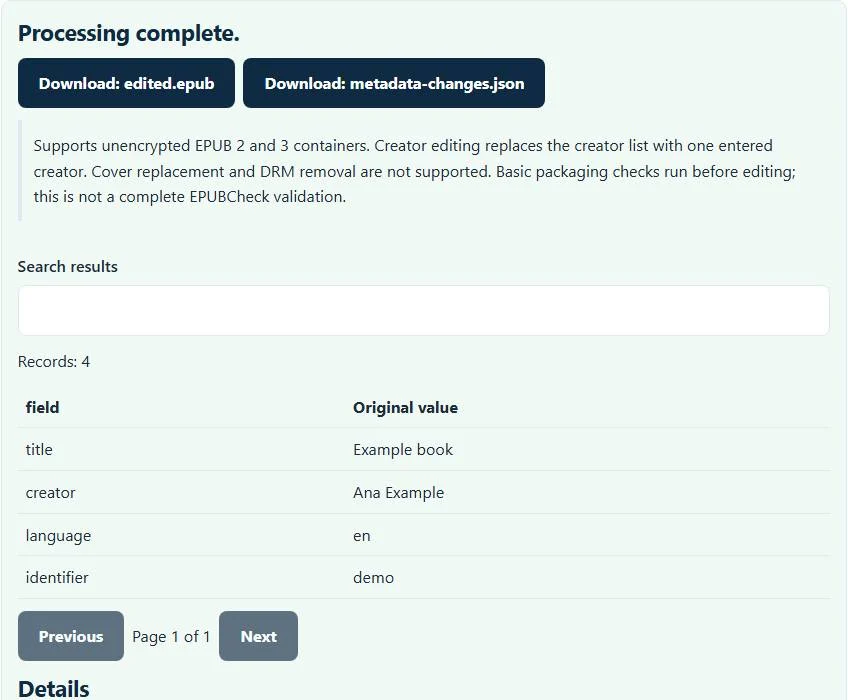
Choose an .epub file or try the supplied demonstration book. File selection processes the publication with the current field values. Leave all New fields blank for an initial inspection. The result displays existing metadata when no edits were requested. Read that information before entering a replacement title, creator, language or description.
Fill only the fields that need a change, then press Process files again. Each label explains that a blank value keeps the existing field. Review the before-and-after rows, then download edited.epub and metadata-changes.json. Keep the source book separately until you have opened the edited copy in your intended reading application.
Where an EPUB stores the information you see
An EPUB is a publication archive containing a container document, a package document, reading-order references and content files. The package’s metadata describes the publication, including title and creator values. Reading systems can use these fields for a bookshelf listing, independently of the external filename or the title printed on a cover image.
This EPUB metadata editor locates the package through META-INF/container.xml and changes supported metadata fields there. It does not assume every book has a file with the same OPF filename. Chapter resource bytes are carried into the rebuilt archive, although ZIP compression and package metadata change. The result is a new file, so do not overwrite the only original copy without reviewing it.
Worked example: change a title without rewriting the book
Suppose your owned manuscript’s bookshelf title is Coastal Notes draft and its creator is Ana García. Enter Coastal Notes in New title and leave New creator, New language and New description blank. The change table shows the old and new title. The creator remains Ana García, and the chapter text is not revised to match the new title.
To change the language metadata, enter a supported tag such as en or en-GB. That identifies the language metadata value; it does not translate the prose or rewrite pronunciation hints. If the language field is wrong, correcting it can improve the metadata available to a reading system, but its behavior still depends on that application.
Creator editing needs care in books with several authors
Entering a New creator replaces the creator list with one entered creator. It is not an add-author control. A coauthored publication can therefore lose its separate creator entries if you type only one name. Leave creator blank when those authors are already correct, or use an editor that explicitly supports multiple creator roles and sorting refinements.
When a creator changes, old sort-name refinements tied to the replaced creator are removed so an obsolete author sort value does not survive that edit. This does not provide a general editor for publisher, identifier, series, contributor roles or every refined metadata property. The available controls define the supported editing scope.
Packaging checks, encrypted books and publication limits
Before editing, the EPUB metadata editor checks basic EPUB packaging: the mimetype entry, container reference, package version, required metadata, manifest resources and spine references. Missing resources or invalid references should be fixed before relying on a rewritten book. The output is rebuilt with the EPUB mimetype entry first and uncompressed.
Books with an encryption document are rejected, including publications using that mechanism for protected resources. Signed publications are not edited because changing package metadata would invalidate their signatures. This is broader than merely saying commercially DRM-protected ebooks do not work. The page’s size limit and archive expansion limits also bound local processing; a small compressed input can expand into much more data.
Check the edited copy in the receiving reader
Use the EPUB validator for this site’s basic package preflight, then open the edited file in your reading app. The EPUB metadata editor does not run the complete EPUBCheck validation suite or prove store submission eligibility. An app may cache its old title and author, so test a newly imported copy before diagnosing a metadata failure.
If you are examining font resources from a publication you own and are licensed to modify, the WOFF2 font converter handles its separate supported font-decoding task. It is not part of EPUB metadata editing and does not grant font rights. Review the change log, keep a versioned source book, and use a full publication editor for cover art, chapter titles, navigation or advanced metadata changes.
Common EPUB metadata editor errors and how to fix them
When the EPUB metadata editor cannot use a file, it stops with one clear message instead of producing a half-finished download. These are the problems people run into most often, with the fix for each:
- The file is not a supported EPUB 2/3 container. The mimetype entry is missing or does not read application/epub+zip, or the package version is not 2.x or 3.x.
- Encrypted EPUBs are not supported. The book contains META-INF/encryption.xml, which is typical of DRM-protected purchases. The editor does not remove DRM.
- Fix the EPUB packaging errors before editing metadata. The preflight found errors such as a manifest item pointing to a missing file, or the book is signed. Fix them first; the validator lists them.
- Enter a language tag such as en or en-US. The language field must be a BCP 47 style tag, not a language name such as English.
Privacy: the EPUB metadata editor runs in your browser
EPUB metadata editor processing happens with JavaScript in a background worker on this page. Your file is not uploaded to a FileFix server, and the results you download are created in your browser’s memory. Unpublished manuscripts, designs and product data stay on your computer. When you finish on a shared computer, clear the selection or close the tab.
For the underlying format rules, see the W3C EPUB 3.3. The EPUB metadata editor follows the subset described on this page rather than every optional feature in those documents.
Sources
Questions about this tool
Does changing the filename fix the bookshelf title?
Not necessarily. Reading apps can show the title stored in the package metadata. This editor changes that supported internal title field.
Can I add another author without replacing the existing authors?
Not with the current New creator control. A nonblank creator value replaces the creator list with one entered creator.
Can a blank field delete the existing description?
No. Blank editing fields keep their current values. This interface does not use an empty field as a delete instruction.
Will the editor change the cover or chapter text?
No. It edits the supported package metadata. Cover replacement, chapter editing and DRM removal are outside its scope.
Why can an apparently ordinary book be rejected as encrypted?
An EPUB with META-INF/encryption.xml is outside the supported editing profile, including protected-resource or font-obfuscation packaging. The tool does not decrypt those resources.
Review the supported formats and limitations before using an output file. File processing happens in your browser.