
How to use the EPUB validator
- Choose one
.epubfile. The Try an example button loads a small local demonstration book. - Select Process files. The archive is opened locally; the ebook’s scripts and chapters are not executed.
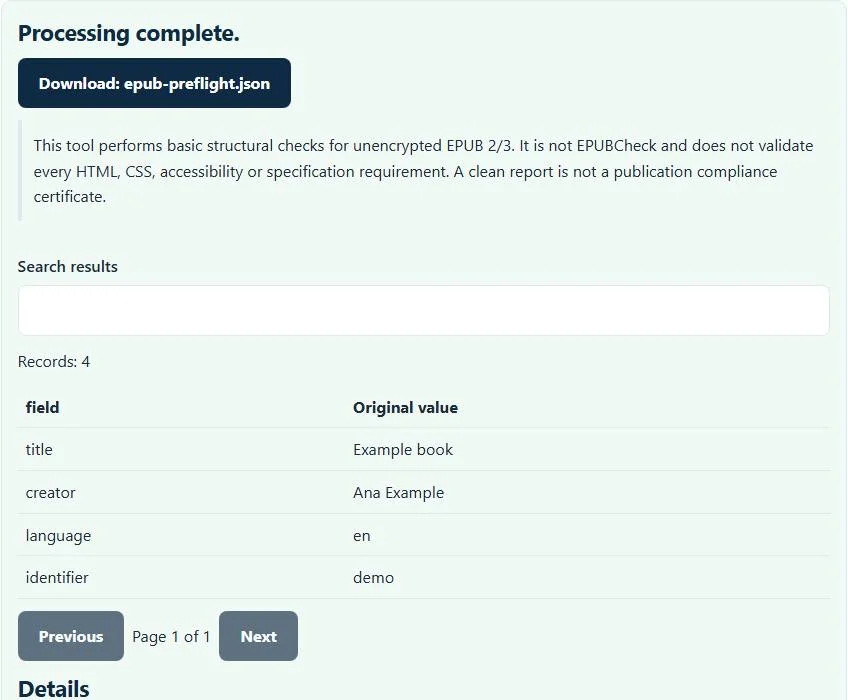
- Read the metadata preview and the errors or warnings associated with the supported package checks.
- Download
epub-preflight.jsonto preserve the findings before editing the source book.
Keep a backup of the original EPUB. This EPUB validator reports findings rather than rewriting the archive, repairing chapters or removing encryption. If a fatal package issue prevents inspection, correct that issue before expecting a useful downstream report.
The checks included in this package preflight
The EPUB validator checks the expected mimetype content, reads META-INF/container.xml, and follows its rootfile to the OPF package document. It checks that the package declares a supported 2.x or 3.x version, that manifest IDs are present and not duplicated, and that referenced local resources exist in the archive.
The spine’s idref values must point to manifest IDs. Required basic metadata is inspected for title, language and identifier. The preview also lists supported creator, description and publisher values. These checks focus on whether the package points coherently to its parts; they do not prove that those parts contain fully conforming content.
Example: a chapter exists but its manifest link is wrong
Imagine an archive containing EPUB/chapter-1.xhtml, while its package document lists chapter1.xhtml relative to EPUB/package.opf. The converter resolves that declared path and reports that the manifest file cannot be found. A readable-looking chapter filename is insufficient if the manifest points elsewhere.
Similarly, a spine item with idref="chapter-one" is invalid for this check when no manifest item uses ID chapter-one. Correct the reference in the authoring source and export again. The EPUB validator cannot decide whether a different file was meant to occupy that reading-order position, so it does not silently substitute one.
Why the mimetype entry matters
An EPUB is ZIP-based, but its packaging convention has specific requirements for the mimetype entry. This checker reports when it is not first, is compressed, or contains unexpected extra-field packaging. The value must identify the archive as an EPUB rather than merely naming it with an .epub suffix.
A general-purpose ZIP program can produce an archive that opens successfully while still using the wrong EPUB packaging arrangement. Re-exporting through an ebook authoring tool is usually safer than repeatedly renaming or repacking a damaged file. A package that passes these checks still needs content validation appropriate to its publishing destination.
This result is narrower than full EPUBCheck
W3C’s EPUBCheck is a separate conformance checker. This browser tool does not run it and does not validate every XHTML, CSS, navigation, accessibility, media-overlay or specification rule. Its report explicitly identifies the basic package-preflight scope.
Do not treat an empty error list as a retailer acceptance guarantee. Run the required full checker, inspect the book in representative reading systems, and review accessibility separately before distribution. When the full checker produces many errors, fix the earliest packaging or reference problem first: a missing resource can lead to several later symptoms.
Metadata editing and other publishing checks
Use the EPUB metadata editor when a structurally suitable unencrypted book needs a supported title, creator, language or description change. It has its own safeguards and does not replace chapter editing. This EPUB validator alone does not modify those fields.
For a print edition, the print-ready checker estimates a different set of image and PDF properties. For a bibliography stored alongside the book, the BibTeX formatter addresses bibliography syntax. Choose checks that match the actual deliverable instead of treating one preflight report as universal publication approval.
Troubleshooting encrypted, oversized or damaged books
Archives that declare encryption are rejected, including cases where resource obfuscation requires handling beyond this supported profile. The tool does not bypass DRM. A broken ZIP, missing container or unreadable package XML can stop inspection before a detailed resource report is available. Obtain a fresh export from the authorized source.
Compressed file size is only part of browser memory use; expanded resources also count toward safety limits. Try a smaller authoring export if needed. Processing remains local, but the downloaded report may reveal unpublished metadata, so review it before sharing. Preserve the original ebook and use the findings as a focused repair checklist.
Common EPUB validator errors and how to fix them
When the EPUB validator cannot use a file, it stops with one clear message instead of producing a half-finished download. These are the problems people run into most often, with the fix for each:
- Missing or duplicate manifest ID / Manifest file not found A manifest item has no unique id or points to a file that is not in the ZIP.
- Spine idref does not exist The reading order refers to a manifest ID that is not defined.
- mimetype must be the first ZIP entry, uncompressed and without extra fields. Re-zipping a book with an ordinary archiver often breaks this rule.
- Encrypted EPUBs are not supported. DRM-protected books cannot be inspected.
Privacy: the EPUB validator runs in your browser
EPUB validator processing happens with JavaScript in a background worker on this page. Your file is not uploaded to a FileFix server, and the results you download are created in your browser’s memory. Unpublished manuscripts, designs and product data stay on your computer. When you finish on a shared computer, clear the selection or close the tab.
For the underlying format rules, see the W3C EPUB 3.3. The EPUB validator follows the subset described on this page rather than every optional feature in those documents.
Sources
Questions about this tool
Is this browser tool the official EPUBCheck?
No. It performs a smaller set of ZIP, container, OPF, manifest and spine checks. Run EPUBCheck separately for broader conformance validation.
Does a clean report guarantee retailer acceptance?
No. Retailers and reading systems can require content, accessibility and other rules outside this structural preflight.
Can it remove or validate DRM encryption?
No. Archives declaring encryption are outside the supported profile and are rejected; DRM is not bypassed.
Will the validator fix missing chapter files?
No. It reports broken references and missing resources. Correct the authoring source and export a new EPUB.
Does it inspect every XHTML and CSS rule?
No. Full chapter, stylesheet, navigation and accessibility validation is outside this basic package-checking scope.
Review the supported formats and limitations before using an output file. File processing happens in your browser.