
Use the BibTeX formatter to give a bibliography consistent separation between entries without normalizing away custom fields, string macros or comments. Open or paste a .bib document, inspect the output and download formatted.bib. The BibTeX formatter checks supported entry syntax and duplicate citation keys, while retaining original field text and entry order. It is a conservative formatting pass rather than a citation cleaner: it does not rewrite references, look up DOIs, resolve cross-references or automatically delete duplicate publications.
What this BibTeX formatter changes
Bibliographies collected from several sources often have inconsistent blank lines between entries. A formatting pass can make a file easier to scan, but aggressive normalization can also remove custom fields or change macros that a project depends on. This implementation separates entries consistently while preserving their original lexical field content.
It does not sort the bibliography, align every equals sign or impose a canonical field order. Entry types and field spelling remain as supplied. The parser checks balanced entry delimiters and supported expression syntax before offering a result, then a maintained BibTeX parser checks the syntax without replacing the output with normalized records.
Format and review a bibliography
- Open a .bib or .bibtex file with Choose file, or paste the bibliography text into the input.
- Review Input encoding. If author names are garbled, select the original encoding and process again.
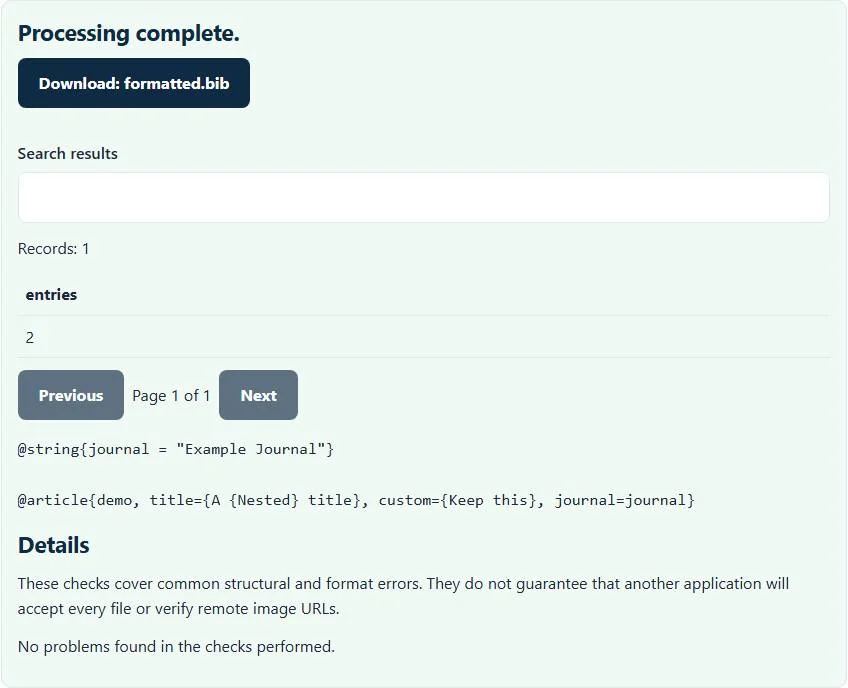
- Select Process files after pasting or changing the controls. The example includes a string macro, nested title braces and a custom field.
- Inspect the text preview and reported entry count.
- Download
formatted.bib, compare it with your original and compile a small citation test in the actual project.
The file remains local to the browser and no reference lookup occurs. Successful formatting says the supported parsing checks completed, not that every bibliography style will display every field or that the cited works have been verified.
Example: preserve a string macro and nested braces
@string{journal = "Example Journal"}
@article{demo, title={A {Nested} title}, custom={Keep this}, journal=journal}
The BibTeX formatter inserts consistent separation between these two entries while keeping the journal macro, the custom field and the nested title braces. It does not substitute “Example Journal” into the article, remove the custom field or strip braces that may protect capitalization. The citation key stays demo.
This matters when a .bib file is shared between styles or contains project-specific fields. A field that classic BibTeX ignores may still be useful to another processor or workflow. Keeping its text is different from validating its meaning: the BibTeX formatter does not establish that a custom field will appear in your final references.
Duplicate keys and parser errors
Two ordinary bibliography entries using the same citation key stop formatting. The tool does not silently keep the first one or rename the second because that could alter which source a citation refers to. Inspect the references, choose a deliberate key change if they are distinct, and update affected citation commands in the project.
Matching titles or DOIs with different keys are a separate duplicate-publication problem and are not automatically removed. Likewise, case-related differences, missing required fields for a chosen bibliography style and crossref relationships need project-aware review. The current duplicate-key check compares the supplied keys; it is not a comprehensive bibliography audit.
If syntax checking fails, look for an unmatched brace or quote, an incomplete entry, or a malformed field expression. Preserve escaped characters and nested braces while correcting it. A text editor that converts straight quotation marks into typographic quotes can damage syntax even when the text looks attractive on screen.
Where formatting belongs in your reference workflow
Start with a conversion tool when the input is not already BibTeX. RIS to BibTeX and NBIB to BibTeX map their respective source formats and generate new keys. This formatter instead preserves the keys and field text of an existing .bib. Mixing those purposes can lead to unnecessary changes.
If your destination is a reference manager rather than a LaTeX project, BibTeX to RIS conversion produces another interchange format and has field-mapping limitations. Formatting alone does not create a RIS file.
Consult the BibTeX usage guide for the bibliography-processing workflow. Keep the original before a bulk cleanup, test the downloaded file with the processor and style used by your document, and check references with corporate authors, macros and unusual types. The conservative output is designed to preserve those details for informed review rather than guess at a universally correct bibliography.
Common BibTeX formatter errors and how to fix them
When the BibTeX formatter cannot use a file, it stops with one clear message instead of producing a half-finished download. These are the problems people run into most often, with the fix for each:
- Check BibTeX entry delimiters and braces. An entry has unbalanced braces or quotes, or text outside entries cannot be read.
- Keys must be present and unique. Review duplicate keys before exporting. Two entries share a citation key. Rename one so citations resolve to the right work.
- Accents or symbols look wrong That is an encoding mismatch, not a structural error. Choose the real source encoding in Input encoding and process again instead of editing the output by hand.
Privacy: the BibTeX formatter runs in your browser
BibTeX formatter processing happens with JavaScript in a background worker on this page. Your file is not uploaded to a FileFix server, and the results you download are created in your browser’s memory. Unpublished reading lists and draft bibliographies stay on your computer. When you finish on a shared computer, clear the selection or close the tab.
For the underlying format rules, see the BibTeX format description. The BibTeX formatter follows the subset described on this page rather than every optional feature in those documents.
Sources
Questions about this tool
Does the formatter sort entries or fields?
No. It consistently separates entries while retaining source order and original field text.
Are custom fields and string macros retained?
Yes. The formatter preserves their lexical content rather than rebuilding the bibliography from normalized citation records.
What happens to duplicate citation keys?
They stop formatting so you can resolve the ambiguity deliberately. The tool does not rename or delete a record automatically.
Does it find duplicate papers with different keys?
No. DOI/title deduplication is outside the current formatting checks.
Does it resolve crossref or verify bibliographic accuracy?
No. Cross-reference semantics, style-required fields, DOI validity and publication accuracy need separate review.
Review the supported formats and limitations before using an output file. File processing happens in your browser.