
How to convert BibTeX to RIS
- Choose a
.bibor.bibtexfile, or paste the bibliography into the text field. - Use Input encoding to decode the source correctly. Start with
auto, then check author accents and titles. - Select Process files, or select Try an example to inspect a fictional journal article.
- Review the reference preview and download the RIS output and JSON conversion report.
Keep the original bibliography alongside both downloads. A RIS library and a BibTeX file organize fields differently, so the conversion report is useful when checking a record that does not look the same after import.
What changes between the bibliography formats?
BibTeX uses entry types and named fields enclosed in a structured record, such as @article with author, title and year. RIS uses tagged lines, such as TY for the record type and AU for an author. Multiple authors are represented through the parser’s bibliographic mapping rather than by treating the author string as ordinary prose.
Common titles, names, years, journal information and DOI values can be inspected in the normalized preview. Custom macros, uncommon entry types, corporate authors and fields specific to a particular bibliography package need individual review. There is no promise that every proprietary field has an equivalent in RIS.
Worked example: one journal reference
@article{Garcia2024,
  title={Coastal observations},
  author={García, Ana},
  year={2024},
  journal={Example Journal},
  doi={10.1234/example}
}
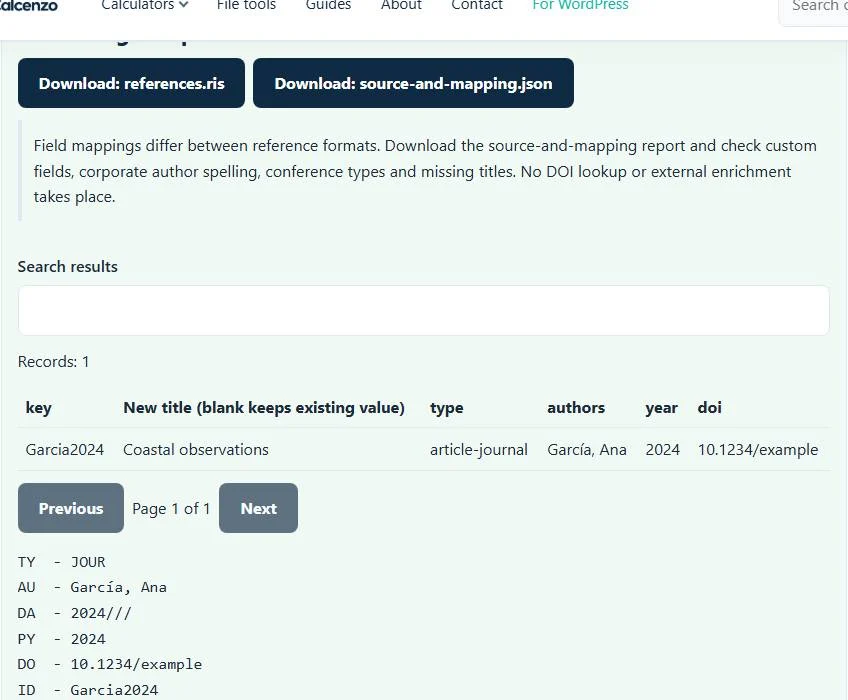
The built-in sample becomes one RIS journal record, retaining the mapped title, author, publication year, journal and DOI. The source report includes the submitted bibliography and normalized records, letting you compare the source fields with the representation used for export.
The key Garcia2024 identifies a citation in a LaTeX project; it is not a publication identifier verified by this BibTeX to RIS converter. After importing the RIS into a reference manager, check the record itself rather than assuming a citation key will become the destination application’s permanent ID.
Import into a reference manager without losing your audit trail
Choose the destination application’s documented file-import workflow and select RIS where available. Zotero’s migration guidance lists standardized reference formats including RIS and BibTeX. If your chosen application already accepts BibTeX well, direct import may be more appropriate than adding another conversion step.
Test a few representative references before importing a large bibliography: include a multi-author paper, a book chapter and a corporate author if your source uses them. Compare titles, names, dates and identifiers. Existing destination-library duplicates and import preferences are outside the BibTeX to RIS converter’s control; it does not merge your online library or remove duplicated records.
Names, accents and fields that need special attention
Check that accented characters survive decoding and that an organization name remains recognizable as an author. Bibliography brace protection and LaTeX commands may be interpreted through the parser rather than carried as raw RIS syntax. Differences in how names or capitalization appear deserve a source comparison, particularly for citations with legal or institutional authors.
A DOI value is transferred as data, not checked against a publisher. Likewise, a URL is not fetched, and a local attachment path does not bundle its PDF. The BibTeX to RIS converter has no external enrichment service. Missing or mistaken bibliographic information must be corrected from the actual publication or your reference library.
Related bibliography tasks
If the BIB source is difficult to read or has syntax issues, use the BibTeX formatter for its own supported formatting and diagnostics. To move tagged RIS references in the other direction, use the RIS to BibTeX converter. A round trip is a useful comparison exercise, but it is not evidence that every source field survives unchanged.
For PubMed exports, the NBIB to BibTeX converter targets a distinct source format. Choose the BibTeX to RIS converter that matches the actual file contents, not just a renamed extension. Reference-manager exports with the same title may use different supported fields.
Troubleshooting and reviewing the final bibliography
An empty file, malformed entry structure or unsupported source syntax may prevent parsing. Check balanced braces and quotation marks in the source and try a small representative entry. If automatic decoding produces garbled names, select the known input encoding before retrying. Incorrectly saved replacement characters cannot be recovered merely by changing that setting.
File processing stays in the browser, including the source-and-mapping report. That report may contain unpublished project notes or library annotations, so review it before sharing. Finish by importing a small sample into the intended application, comparing its records with the source, and preserving the original BIB as your reference point.
Common BibTeX to RIS converter errors and how to fix them
When the BibTeX to RIS converter cannot use a file, it stops with one clear message instead of producing a half-finished download. These are the problems people run into most often, with the fix for each:
- The reference file could not be parsed. Check record boundaries and the selected format. Unbalanced braces or quotes stop parsing. An entry with a missing closing brace usually swallows the next entry.
- The file contains too many records for this browser tool. Up to 10,000 entries are converted at once.
- A warning that a record has no title The entry converts but needs a title before you rely on it.
- Accents or symbols look wrong That is an encoding mismatch, not a structural error. Choose the real source encoding in Input encoding and process again instead of editing the output by hand.
Privacy: the BibTeX to RIS converter runs in your browser
BibTeX to RIS converter processing happens with JavaScript in a background worker on this page. Your file is not uploaded to a FileFix server, and the results you download are created in your browser’s memory. Unpublished reading lists and draft bibliographies stay on your computer. When you finish on a shared computer, clear the selection or close the tab.
For the underlying format rules, see the BibTeX format description. The BibTeX to RIS converter follows the subset described on this page rather than every optional feature in those documents.
Sources
Questions about this tool
Does converting BibTeX to RIS verify a DOI?
No. A DOI is mapped as a bibliographic field. No external DOI lookup, publication verification or enrichment takes place.
Will linked PDFs move into the reference manager?
No. The conversion downloads bibliography data and a report, not attached PDF files.
Why should I download the JSON mapping report?
It preserves the submitted source and normalized records so you can inspect fields that changed or lack a straightforward RIS equivalent.
Can I import BibTeX directly instead?
Possibly. Some reference managers accept both BibTeX and RIS. Use the documented import format that best preserves your source library.
Are all custom BibTeX fields guaranteed to survive?
No. Common bibliographic mappings are supported; unusual fields, macros and record types require review.
Review the supported formats and limitations before using an output file. File processing happens in your browser.