
ASS to SRT conversion is helpful when a subtitle file contains styled dialogue but your receiving player or editing workflow needs a simpler timed-text file. This ASS to SRT converter reads supported ASS and SSA dialogue, keeps its start and end times, and writes numbered UTF-8 SRT cues. Commas inside dialogue and explicit line breaks are retained. Fonts, positioning, karaoke instructions and vector drawings cannot be carried over as the original ASS presentation, so the result includes diagnostics and a plain-text preview for review.
How to convert ASS to SRT in this interface
Choose an .ass or .ssa file, drag it into the file area, or paste the subtitle text into the available text field. File selection starts processing; pasted text is processed when you press Process files. Use Try an example to see how italic override tags and an ASS line break become readable subtitle text.
The Input encoding control defaults to auto. If accented characters or punctuation appear incorrectly, select the source encoding and process again. Check the converted cue preview and any warnings before downloading the SRT output. A conversion report lists relevant diagnostics. Keep the original styled subtitle file alongside the new compatibility copy.
Dialogue, formatting and drawing cues are different data
ASS uses an Events section with a Format declaration describing each Dialogue row. Text can contain commas, so reading the row as an ordinary unrestricted CSV split would damage dialogue. This parser follows the declared event fields and joins the text portion correctly. ASS timestamps use fractions of a second, which are converted into millisecond cue times.
Override blocks can describe italics, color, position, font changes and animated effects. The output here is plain subtitle text, so those presentation instructions are stripped instead of being promised as compatible SRT styling. Vector drawing cues are omitted with a warning because their coordinates are not readable spoken dialogue. Check whether a removed drawing contained information that needs a separate text caption.
Worked example: comma and hard line break
The sample dialogue runs from 1.00 to 3.50 seconds. The comma in Hello, Ana! belongs to the dialogue and must remain in the SRT text. The ASS \N marker becomes a real line break. The italic instruction is removed, leaving a two-line cue numbered 1, beginning at 00:00:01,000 and ending at 00:00:03,500.
[Events]
Format: Layer, Start, End, Style, Name, MarginL, MarginR, MarginV, Effect, Text
Dialogue: 0,0:00:01.00,0:00:03.50,Default,,0,0,0,,{\i1}Hello, Ana!\NWelcome.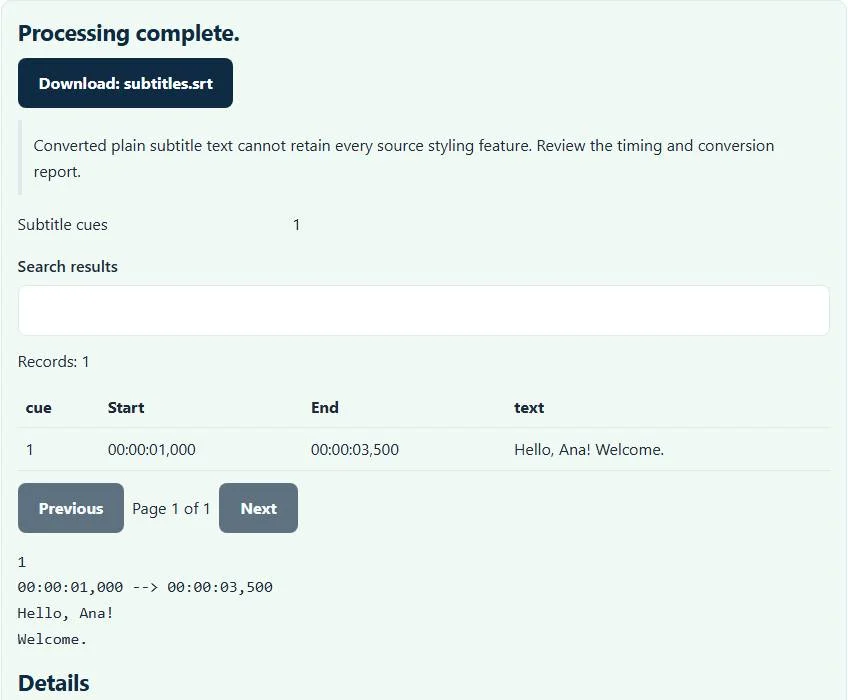
Choose a plain subtitle copy only when it suits the job
A lecture recording or straightforward conversation may only need dialogue and timing. Anime signs, song lyrics and heavily positioned fansubs often depend on richer visual instructions. The SRT copy can make the words accessible to a simpler importer, but it is not a rendered version of that original design. Conversion does not burn text into a video or replace a video-rendering pipeline.
Karaoke syllable timing, layered animation and spatial placement are lost. Simultaneous dialogue remains as overlapping cues rather than being automatically separated by speaker. Whether a destination displays those overlaps clearly depends on its own subtitle support. Read overlapping portions against the video before treating the simplified file as ready for viewers.
Timing problems conversion cannot infer
Changing file format does not repair captions that were already offset or drifting against the video. A cue beginning at the wrong moment will retain that wrong moment. Use the SRT time shifter for a known offset, two-anchor correction or supported frame-rate adjustment after converting.
Likewise, missing Events fields, impossible timestamps and reversed cue ranges need source correction. If the resulting SRT needs ordinary structural cleanup, the subtitle repair tool handles its supported separator and numbering fixes. Those repairs do not recreate deleted ASS styles or recover a drawing as text.
Encoding and downstream checks
The downloaded SRT is UTF-8. This preserves correctly decoded Unicode dialogue, but it cannot reconstruct characters already replaced by question marks before you selected the file. Compare a line with the original subtitle editor when choosing an encoding. The file area shows the current size limit, and parsing also uses cue-count safety limits to prevent oversized inputs from running without bounds.
If a web-video workflow needs WebVTT rather than SRT, continue with SRT to VTT. An exported YouTube-style SBV file belongs in SBV to SRT instead of being renamed .ass. Check a few representative cues in the final player, particularly multiline dialogue and simultaneous speakers, before distributing the converted captions.
Common ASS to SRT converter errors and how to fix them
When the ASS to SRT converter cannot use a file, it stops with one clear message instead of producing a half-finished download. These are the problems people run into most often, with the fix for each. Most ASS to SRT converter errors trace back to how the source file was exported, so correcting the source and running the ASS to SRT converter again is usually faster than working around the message.
- The file is empty or has no usable records for this ASS to SRT converter. The script has no Dialogue lines in its [Events] section, or the file contains only whitespace.
- The file does not match the expected format or has invalid structure. The Format line in [Events] must list Start, End and Text, with Text as the last field.
- A subtitle ends before it starts. A cue has an end time earlier than (or equal to) its start time, often from a typo such as 00:01:05 written as 00:00:65 or swapped times. Correct that cue in a text editor and process the file again.
- A warning that a drawing cue was omitted Vector drawing commands cannot become SubRip text, so that cue is skipped and reported.
Privacy: the ASS to SRT converter runs in your browser
ASS to SRT converter processing happens with JavaScript in a background worker on this page. Your file is not uploaded to a FileFix server, and the results you download are created in your browser’s memory. Unreleased video scripts and captions stay on your computer. When you finish on a shared computer, clear the selection or close the tab.
For the underlying format rules, see the Matroska subtitle formats (SSA/ASS) and Library of Congress description of SubRip (SRT). The ASS to SRT converter follows the subset described on this page rather than every optional feature in those documents.
Sources
Questions about this tool
Will karaoke syllable timing survive ASS to SRT?
No. This converter keeps readable dialogue and cue start/end times, but ASS karaoke instructions are outside the plain SRT output.
Why is a drawing cue missing from my output?
ASS drawing instructions contain vector coordinates rather than ordinary caption text. Drawing cues are omitted with a warning; review the original to decide whether a text replacement is needed.
Are commas inside dialogue supported?
Yes. The parser follows the Events Format declaration so commas in the text portion are kept as dialogue.
Can conversion make subtitles match a different video cut?
No. It preserves supported cue timing. Correct a known offset or drift using the separate timing tool and verify against the actual video.
Does an .ssa file work here?
The accepted inputs include supported SSA dialogue files as well as ASS. Rich presentation is flattened to the same plain SRT scope.
Review the supported formats and limitations before using an output file. File processing happens in your browser.