
Convert SRT to TXT when you need readable dialogue rather than a timed subtitle file. This SRT to TXT converter removes cue numbers and end times, reduces supported subtitle markup to plain text, and exports the dialogue in source order. You can keep cue start timestamps for reference or join the cues into one paragraph. It is useful for reviewing interviews, preparing accessible notes and searching spoken wording, while keeping the original SRT separate for playback and editing.
How to convert SRT to TXT
- Choose a supported
.srtfile or paste its complete numbered cues. Try an example demonstrates multilingual text. - Set Input encoding if automatic decoding does not display the dialogue correctly.
- Enable Include cue start timestamps when you want time references. Enable Join cues into a paragraph for a continuous text block.
- Select Process files, inspect the text preview and download
transcript.txt.
Leave paragraph joining off when individual caption boundaries help your review. This output is a plain UTF-8 text file, not a word-processing document or a subtitle format ready for video playback.
What happens to subtitle numbers, timing and formatting?
An SRT cue normally combines an index, a start/end time range and one or more dialogue lines. The transcript keeps the dialogue but removes the index and end time. Optional start references use an hours:minutes:seconds,milliseconds display in brackets. Supported markup is flattened so that formatting tags do not remain as transcript styling.
The SRT to TXT converter preserves cue order. It does not listen to the video, identify speakers, translate languages or rewrite sentences. A line that is repeated in two source cues may remain repeated in the transcript. That can be correct for the subtitle file, even when a human editor would combine it for publication.
Example: a multilingual subtitle becomes readable text
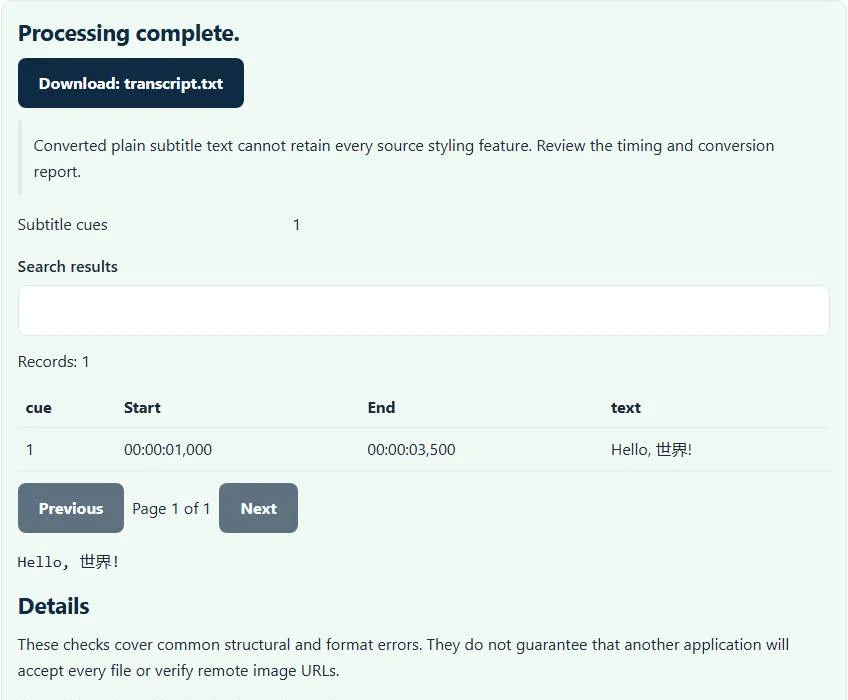
The sample has a single cue:
1
00:00:01,000 --> 00:00:03,500
Hello, 世界!
With both options off, the exported text is Hello, 世界!. With start timestamps enabled, it begins [00:00:01,000] Hello, 世界!. The original 3.5-second end time is not included. The characters remain Unicode rather than being transliterated into English letters.
For a file with several cues, paragraph joining places their text together with spaces. It does not determine whether the end of one cue and the start of another form a new sentence. Proofread punctuation and speaker changes before sharing a polished transcript.
Choose a transcript layout for your workflow
Keep start timestamps when a reviewer needs to locate a quotation in the video. Retain separate cue lines while checking translations or comparing captions with an approved script. Join a paragraph when you need a compact passage for ordinary reading or a text-search task, accepting that original cue boundaries become less visible.
Plain text cannot store styled italics, colored speakers or caption position. If a phrase’s emphasis matters editorially, record it separately in your notes. The transcript is derived from the supplied subtitles; it cannot recover words that were omitted or incorrectly transcribed in the SRT. Review against the audio when accuracy matters.
Troubleshooting malformed subtitles and garbled accents
The parser expects recognizable SRT timing blocks and an end time that is not earlier than its start. Empty input, missing time ranges and impossible start/end ordering need correction before a reliable transcript can be made. The subtitle repair tool can normalize supported timing separators and cue numbering; it cannot invent missing speech or reconstruct corrupted timing.
If the text contains replacement characters or broken accents, choose the correct source encoding and process again. Automatic detection cannot identify every historic character set. Once characters were permanently replaced in an earlier export, changing the decoding setting cannot recreate the missing original letters.
Transcript export and subtitle conversion solve different tasks
Use this page when you intentionally want to lose playback timing. Use the SRT to VTT converter when you need captions in WebVTT instead. If your source is already WebVTT, the VTT to SRT converter can produce supported SRT cues before transcript export, with its own documented formatting losses.
Combining transcript lines is also different from synchronizing captions. For a subtitle file that is consistently early or late, correct its timing in a dedicated timing tool while retaining the original cue structure. Removing timestamps hides a synchronization problem; it does not fix the subtitles used by a player.
Review the result before quoting or publishing
Check names, technical terms, numbers and any cue that spans more than one speaker. Subtitle files are often shortened for reading speed, so a transcript may differ from a verbatim recording even when conversion was exact. Preserve the source SRT and its video context when you need an audit trail.
Processing takes place in the browser without sending the selected subtitle bytes to WordPress. A confidential interview remains sensitive after download, however. Save the text in an appropriate location and use Clear files and results when you finish. The SRT to TXT output is ready for reading and editing, while the timed original remains your playback source.
Common SRT to TXT converter errors and how to fix them
When the SRT to TXT converter cannot use a file, it stops with one clear message instead of producing a half-finished download. These are the problems people run into most often, with the fix for each:
- A subtitle ends before it starts. A cue has an end time earlier than (or equal to) its start time, often from a typo such as 00:01:05 written as 00:00:65 or swapped times. Correct that cue in a text editor and process the file again.
- The file does not match the expected format or has invalid structure. A block lacks a valid time line, or the file is not SubRip.
- The file is empty or has no usable records for this SRT to TXT converter. No cues were found.
- Accents or symbols look wrong That is an encoding mismatch, not a structural error. Choose the real source encoding in Input encoding and process again instead of editing the output by hand.
Privacy: the SRT to TXT converter runs in your browser
SRT to TXT converter processing happens with JavaScript in a background worker on this page. Your file is not uploaded to a FileFix server, and the results you download are created in your browser’s memory. Unreleased video scripts and captions stay on your computer. When you finish on a shared computer, clear the selection or close the tab.
For the underlying format rules, see the Library of Congress description of SubRip (SRT). The SRT to TXT converter follows the subset described on this page rather than every optional feature in those documents.
Sources
Questions about this tool
Can I remove all subtitle timestamps?
Yes. Leave Include cue start timestamps unchecked. Cue numbers and end times are omitted from the plain-text transcript.
Does paragraph joining detect complete sentences?
No. It joins cue text with spaces. Sentence boundaries, punctuation and speaker changes need human review.
Will the TXT file preserve italics and caption colors?
No. Supported markup is flattened to plain text; visual subtitle styling is not represented in TXT.
Can the converter generate a transcript from a video?
No. It reads an existing SRT file. It does not transcribe audio, perform OCR or translate dialogue.
Are repeated subtitle lines automatically deduplicated?
No. Source cue order and dialogue are retained, so repeated wording may remain in the transcript.
Review the supported formats and limitations before using an output file. File processing happens in your browser.