
VTT to SRT conversion makes an existing WebVTT caption file available as simpler numbered SubRip subtitles. Open or paste your .vtt text, inspect the plain dialogue and supported millisecond timing, and download a UTF-8 SRT file. This is useful when a receiving editor accepts SRT but does not use WebVTT’s richer track features. Styles, regions, cue identifiers, positioning and text markup are not preserved as their original presentation, so the VTT to SRT converter includes a conversion preview and relevant omission diagnostics.
How to convert VTT to SRT
Use Try an example to see a cue with bold text and a positioning setting. For your own captions, choose a .vtt file, drag it into the file area, or paste its complete WebVTT text into the input. Selection starts conversion automatically; press Process files after pasting or changing Input encoding.
Read the cue table, plain-text output and warning messages. Download subtitles.srt when the simplified dialogue and times are appropriate. Keep the original VTT alongside the SRT. A later reverse conversion cannot restore a removed region or style definition just because the output still contains the same spoken words.
The parts of WebVTT that become plain subtitle cues
The input needs the WEBVTT signature. Supported cues provide a start time, an end time and text. Two-component WebVTT times such as 00:01.000 are converted to SRT’s hour:minute:second form. The output uses comma-separated milliseconds and sequential cue numbers, which are different from the source’s optional identifiers.
Ordinary text markup is flattened. Styles, regions and positioning settings cannot be represented faithfully by this plain SRT output. NOTE, STYLE and REGION blocks are omitted with diagnostics, while cue positioning settings are also reported as omitted. The VTT to SRT converter is intended for caption dialogue, not for retaining a WebVTT metadata track’s application-specific behavior.
Worked example: keep the words and time, lose the layout
The example starts at one second and ends at 3.5 seconds. Its align:start setting is not part of the SRT output, and the bold element around 世界 becomes plain text. The resulting cue reads Hello, 世界! with the same supported millisecond range. The conversion warning helps explain why it may look different in the next player.
WEBVTT

00:01.000 --> 00:03.500 align:start
Hello, <b>世界</b>!
1
00:00:01,000 --> 00:00:03,500
Hello, 世界!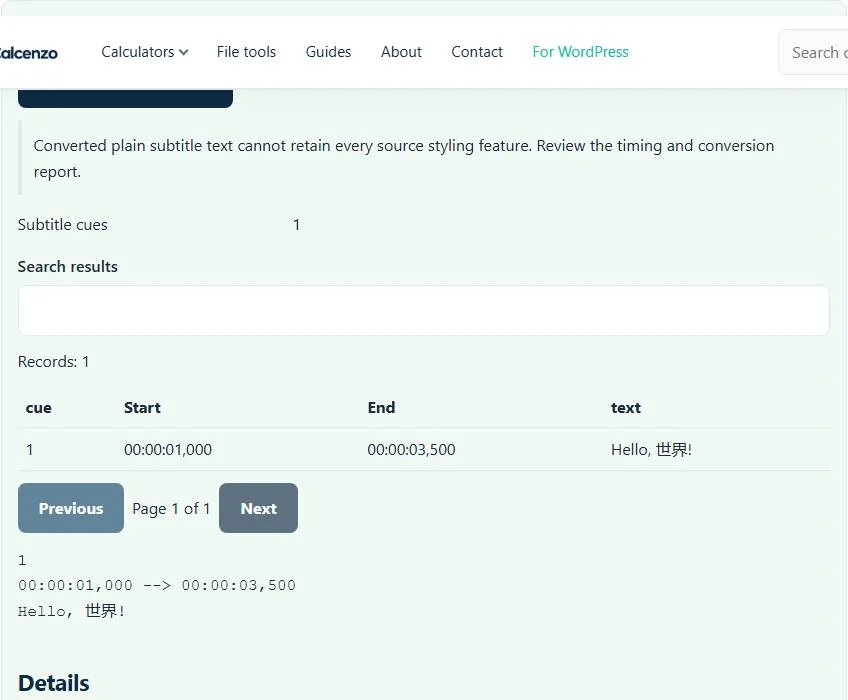
Use this conversion when the destination needs simpler text
A straightforward narration caption is often suitable for a plain SRT copy. A richly positioned educational diagram, interactive metadata track or carefully designed speaker region may not be. Review what the source uses before deciding that simpler output is enough. This VTT to SRT converter does not render captions into video pixels or replace an editor’s layout system.
When two cues overlap, the VTT to SRT converter retains the timing evidence and reports the overlap. That can be intentional for simultaneous dialogue, but the destination may not display it as the original WebVTT player did. Check the affected passage in the actual receiving application rather than assuming the conversion’s successful download proves identical presentation.
Malformed times and text encoding need different fixes
A missing WEBVTT signature, cue text without a timing line or an end time before the start can prevent conversion. Correct the source structure in a text or caption editor. Renaming a file from another caption format to .vtt does not add the expected structure. Format errors should not be bypassed by deleting warnings until a download appears.
The output is UTF-8. Input encoding auto detection can be overridden with the available UTF-8, Windows-1252 and UTF-16 choices. If the original uses a different or incorrectly saved character encoding, inspect it deliberately before accepting a plausible-looking cue table. A valid timing line says nothing about whether an accented surname was decoded correctly. The displayed file-size limit and 100,000-cue bound also apply.
A practical sequence for editing the converted captions
If the plain SRT needs structural cleanup, use the subtitle repair tool. To correct a measured time offset or drift, use SRT time shifting and then test the result against the video. An XML timed-text source belongs in TTML to SRT rather than this WebVTT parser.
For a future web track, SRT to VTT can produce simple WebVTT from the edited SRT, but it cannot reconstruct lost styles and regions. Use the original VTT when rich presentation matters. Keep a clear source/output filename pair and inspect a few cues near the start, middle and end before handing the converted subtitle file to another editor.
Common VTT to SRT converter errors and how to fix them
When the VTT to SRT converter cannot use a file, it stops with one clear message instead of producing a half-finished download. These are the problems people run into most often, with the fix for each:
- The file does not match the expected format or has invalid structure. The file must start with WEBVTT. Files without that header, or SRT files renamed to .vtt, are rejected.
- A subtitle ends before it starts. A cue has an end time earlier than (or equal to) its start time, often from a typo such as 00:01:05 written as 00:00:65 or swapped times. Correct that cue in a text editor and process the file again.
- Warnings about notes, styles, regions or positioning SRT has no place for these WebVTT features, so they are dropped and listed rather than silently lost.
Privacy: the VTT to SRT converter runs in your browser
VTT to SRT converter processing happens with JavaScript in a background worker on this page. Your file is not uploaded to a FileFix server, and the results you download are created in your browser’s memory. Unreleased video scripts and captions stay on your computer. When you finish on a shared computer, clear the selection or close the tab.
For the underlying format rules, see the W3C WebVTT specification and Library of Congress description of SubRip (SRT). The VTT to SRT converter follows the subset described on this page rather than every optional feature in those documents.
Sources
Questions about this tool
Are WebVTT regions and positioning preserved?
No. This implementation produces plain SRT cues. Region, style and positioning information is omitted and relevant diagnostics are reported.
Will the bold or speaker markup remain as WebVTT markup?
The cue text is flattened for this SRT output. Rich markup is not retained as its original WebVTT presentation.
Does VTT to SRT translate the dialogue?
No. It changes cue structure and simplifies markup. Translation is a separate task.
Can I convert a WebVTT metadata track without losing its behavior?
This tool is for caption dialogue. Application-specific metadata-track behavior and identifiers are outside the plain SRT scope.
Can a reverse conversion recover deleted styles?
No. Converting the simplified SRT back to VTT does not recreate the original regions, styles or positioning. Keep the source VTT.
Review the supported formats and limitations before using an output file. File processing happens in your browser.