
Convert TTML to SRT when a caption export arrives as timed-text XML but your next editing step needs a plain SubRip file. This TTML to SRT converter reads a supported paragraph-timing subset from .ttml, .dfxp and .xml files, retains cue text and line breaks, and provides a downloadable .srt preview. It can interpret clock, offset, frame and tick expressions within its documented profile. Presentation details are removed, while timing patterns that cannot be mapped safely are rejected for review.
Using the TTML to SRT converter
- Open the original .ttml, .dfxp or .xml file with Choose file, or paste its XML into the input.
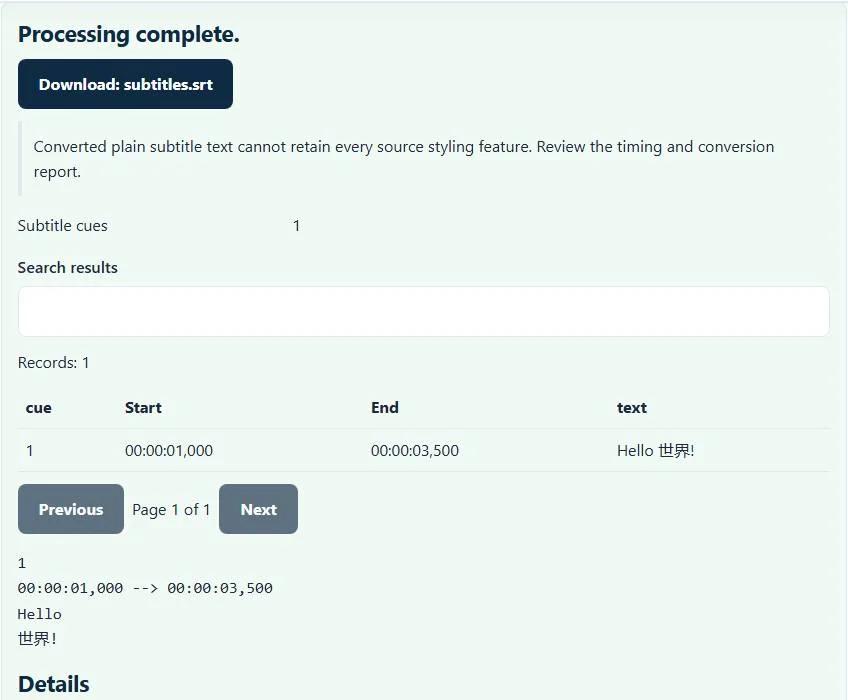
- If you paste a document, select Process files. The example control loads a short bilingual caption that demonstrates a line break.
- Inspect the cue table and text preview. Compare a few start and end times with the source export before continuing.
- Select the download button for
subtitles.srtand test that file alongside the matching video.
An .xml extension alone does not identify a subtitle format. The document must have a timed-text tt root and supported timed paragraphs. An invoice, RSS document or unrelated XML file cannot become SRT simply because it shares that extension. Renaming the file does not change the underlying document.
Supported paragraph timing and text
Each supported p element needs a begin time and either an end time or duration. Clock expressions, such as 00:00:03.500, and offsets, such as 3500ms, describe the same point in this example. Frame and tick timing use the supported document parameters rather than assuming that every source uses the same time unit.
The parser also accounts for parent begin offsets and duration bounds in parallel containers. Untimed spans contribute their text; a br element becomes a caption line break. It does not split a paragraph into separately timed pieces when a span has its own begin, end or duration. That distinction matters for karaoke-style captions and word-by-word highlights.
Worked example: an XML paragraph becomes one cue
<tt xmlns="http://www.w3.org/ns/ttml"><body><div>
<p begin="1s" end="3.5s">Hello<br/>世界!</p>
</div></body></tt>
The output contains cue number 1, the timing line 00:00:01,000 --> 00:00:03,500, and two lines of text: “Hello” and “世界!”. Milliseconds use a comma in SRT. The non-Latin characters are retained in the UTF-8 output; conversion does not translate them or replace them with an English transcription.
For a parent container beginning at 2 seconds and a paragraph beginning at 1 second within it, the paragraph begins at 3 seconds on the resulting timeline. Check this relationship when comparing the preview against nested source XML. Unsupported parent end expressions stop the conversion instead of producing a plausible but uncertain offset.
What is lost when you choose SubRip
SRT represents timed text but cannot reproduce the full TTML presentation model. Regions, positioning, fonts, colors and styled spans are flattened to ordinary cue text. Do not use the converted file as a replacement for a broadcast delivery master that requires those details. Keep the TTML original for that purpose.
If the next application expects web captions instead, use SRT to WebVTT conversion after checking the SRT output. For a file already in WebVTT, VTT to SRT avoids the unrelated XML step. These routes have their own presentation limits, so a round trip does not restore information previously removed.
Troubleshooting unsupported profiles
Sequential containers, timed spans, an explicit timeBase, frame-rate multipliers and unsupported subframe timing are outside this TTML to SRT converter’s profile. Re-export clock-timed, parallel paragraphs from the caption authoring application if that option is available. Do not delete timing parameters from a document just to bypass an error; those parameters may change every cue’s interpretation.
The W3C TTML specification explains the wider model. A successful conversion is a file-format result, not proof of alignment with your particular video edit. Review dialogue near the beginning and end; use the timing tool for an established offset or linear drift rather than assuming conversion itself fixes synchronization.
Common TTML to SRT converter errors and how to fix them
When the TTML to SRT converter cannot use a file, it stops with one clear message instead of producing a half-finished download. These are the problems people run into most often, with the fix for each:
- The file does not match the expected format or has invalid structure. The root element is not tt, or the XML is malformed.
- The TTML timing profile is outside the supported subset. The file uses sequential time containers, span-level timing, frameRateMultiplier or timeBase. These are listed as unsupported.
- Enter valid subtitle times or a finite shift. A time expression is not valid, for example a frame count higher than the frame rate.
- A subtitle ends before it starts. A cue has an end time earlier than (or equal to) its start time, often from a typo such as 00:01:05 written as 00:00:65 or swapped times. Correct that cue in a text editor and process the file again.
Privacy: the TTML to SRT converter runs in your browser
TTML to SRT converter processing happens with JavaScript in a background worker on this page. Your file is not uploaded to a FileFix server, and the results you download are created in your browser’s memory. Unreleased video scripts and captions stay on your computer. When you finish on a shared computer, clear the selection or close the tab.
For the underlying format rules, see the W3C TTML2. The TTML to SRT converter follows the subset described on this page rather than every optional feature in those documents.
Sources
The TTML to SRT follows these specifications and format guides:
Questions about this tool
Can I convert DFXP files here?
Yes, when the document uses the supported timed-text paragraph profile. The converter accepts .dfxp, .ttml and .xml files and checks their contents.
Are TTML colors and screen positions kept?
No. This output is plain SubRip timed text. TTML regions, styling and positioning are not represented in the downloaded SRT.
Why is a file with timed spans rejected?
Separately timed words or spans need additional cue-splitting logic. This converter deliberately rejects that profile rather than inventing paragraph timing.
What does a tick mean in the source file?
A tick depends on the document tick-rate parameters. The supported parser interprets them according to its TTML profile; a tick is not automatically one frame.
Will conversion fix subtitles from a different video cut?
No. Conversion maps file timing and text. Added scenes, cuts and dialogue changes need separate editorial synchronization.
Review the supported formats and limitations before using an output file. File processing happens in your browser.