
Convert BAI2 to CSV when your bank sends previous-day or intraday reports in the BAI cash management format and you need the transactions in a spreadsheet. BAI2 is a comma-separated, record-based format: 01 starts the file, 02 a group, 03 an account, 16 a single transaction and 88 continues the record before it. This BAI2 to CSV converter reads the 16 records under each account and writes one row each.
How to use the BAI2 to CSV converter
- Choose a
.bai,.bai2or.txtfile. - Keep Input encoding on
auto. - Select Process files, or press Try an example to load a three-line fictional report.
- Check the rows and download
bai2.csv.
How type codes decide the sign
BAI2 amounts carry no sign. The BAI specification puts the direction in a three-digit type code instead: 101 to 399 are credit codes, 400 is the total debits summary, and 401 to 699 are debit codes. The BAI2 to CSV converter makes codes 400 through 699 negative and leaves the rest positive. Amounts have implied decimals, so for US dollars 1250 means 12.50.
The funds type after the amount changes how many fields follow. Per the specification, S adds three availability amounts, V adds a value date and time, and D adds a count followed by that many day and amount pairs. The converter skips those extra fields so the bank reference, customer reference and text land in the right columns. Text that runs onto an 88 continuation record is added to the same row.
Worked example: one debit record
01,BANK,RECEIVER,260105,1200,1,80,1,2/
03,123456,USD/
16,451,1250,Z,REF,,CAFE/
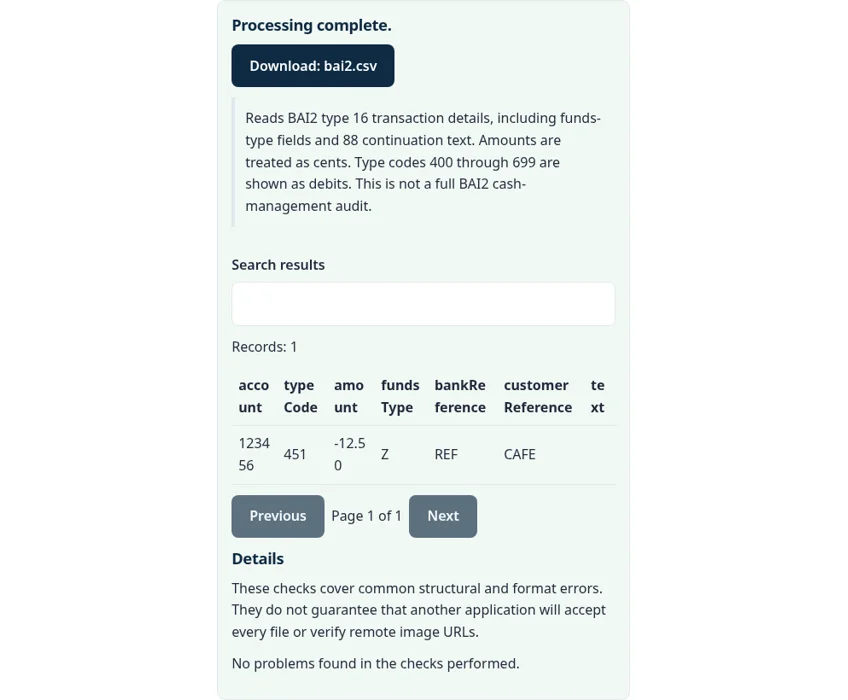
Type code 451 is in the debit range, so the row reads account 123456, type 451, amount -12.50, funds type Z (unknown, the default), bank reference REF, an empty customer reference and text CAFE.
What is not exported
Status and summary amounts on 03 records, group and file trailers (49, 98, 99) and control totals are not rows. Use the trailer totals in the original file to check your work. Type code 890 records are informational and usually carry no amount, so they appear with 0.00. The currency on the 03 record is not checked; the BAI2 to CSV output always assumes two implied decimals.
Common BAI2 to CSV errors
- No rows found. The file has no
16records. Some banks send summary-only reports; ask for a detail report. - Use a decimal amount with no currency symbol and at most two decimal places. A type code or amount field is not a number.
- Text in the wrong column. The bank used a custom field layout; check the funds type value in the original record.
Privacy: your bank report stays in your browser
The BAI2 to CSV converter runs with JavaScript in a background worker on this page. We checked the tool code: the statement is read from your device into browser memory, nothing is sent to a FileFix or Calcenzo server, and the only network requests the tool makes are for its own static files. Your file stays in your browser. The download is built in memory too. Bank files carry account numbers and balances, so on a shared computer clear the selection or close the tab when you are done.
This tool is a reader, not a full BAI2 audit. For other bank formats, see the MT940 to CSV converter and the camt.053 to CSV converter. Building ACH files instead? The NACHA file validator checks them.
Sources
The BAI2 to CSV converter follows these specifications and format guides:
Questions about this tool
How does BAI2 show debits and credits?
By type code. Codes 101 to 399 are credits and 400 to 699 are debits. The converter signs 400 to 699 as negative.
Why is 1250 shown as 12.50?
BAI2 amounts have implied decimals. The converter assumes two, which fits US dollars and most currencies.
What are 88 records?
Continuation records. They carry text that did not fit on the record before them, and the converter adds that text to the same row.
Are balances exported?
No. Only type 16 transaction detail records become rows. Balances and trailers stay in the original file.
Is my file uploaded?
No. The report is read and converted in your browser.
Review the supported formats and limitations before using an output file. File processing happens in your browser.