
How to run the NACHA file validator
Use Try an example to inspect an invented demonstration payment file before opening real account data. Choose an .ach or .txt file, or drag it into the file area. Selection starts the preflight; Process files reruns the selected input. This interface does not provide a text-paste field. Preserve leading spaces, trailing spaces and every character position if you edit the source in your own text editor.
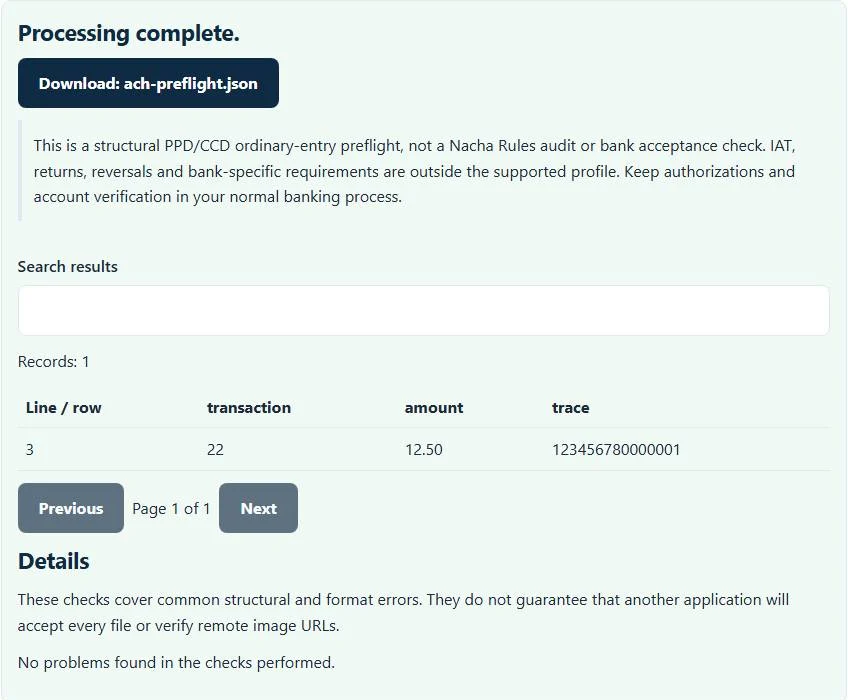
Read the entry preview and reported diagnostics, then download ach-preflight.json. The report includes discovered problems and calculated batch counts, entry/addenda counts, debit cents and credit cents. It does not create a corrected payment file or transmit anything to a bank. Keep the diagnostic report within your normal access controls because transaction details can be sensitive.
Why exactly 94 characters matters
ACH file records use fixed positions rather than commas or variable-width columns. This supported profile expects exactly 94 printable ASCII characters per record. A spreadsheet or text editor that trims padding, changes line wrapping or inserts Unicode punctuation can shift fields even when the file looks readable on screen. The NACHA file validator reports that structure problem instead of reflowing the payment records.
The first character identifies the record type. Header, batch header, entry, addenda, batch control and file control records must appear in the supported order. Padding rows of nines belong after file control, and the complete record count must follow the ten-record blocking convention checked by this profile. A line break separates records; it is not included in their 94-character width.
Worked example: investigate a control-total mismatch
Suppose a fictional batch contains two supported credit entries for $12.34 and $5.66. Their calculated credit total is 1,800 cents, or $18.00. If the batch-control credit field instead contains 1,799 cents, the preflight reports a credit-total mismatch. The amounts in the entry preview help you compare the source transactions with the control record.
Do not edit the total blindly until the report turns clear. Determine whether an entry amount, the control record or the export selection is wrong, and regenerate the file through the authorized payment system where possible. A structurally consistent file can still pay the wrong person or wrong amount if the business data is wrong.
What the routing hash and checksum can establish
The NACHA file validator checks a receiving routing number’s numerical checksum and recomputes the supported entry hash from receiving bank identifiers. Those are different checks: a routing checksum concerns a routing-number pattern, while the entry hash is a control total across entry records. The NACHA file validator compares calculated hashes and counts with the corresponding batch and file controls.
Neither calculation establishes that an account exists, belongs to the named recipient or is eligible for the requested transaction. A mathematically valid routing number can still be wrong for the intended recipient. Keep account verification, authorization records, sanctions or fraud controls and payment approval in your normal banking process; they are outside this file parser.
Supported entries, addenda and explicit exclusions
This is an ordinary PPD/CCD structural preflight. It checks supported entry transaction codes, declared addenda relationships, compatible addenda sequencing and matching batch identifiers. An unsupported layout is not treated as a passed file merely because its records have the right length. Review the line-level result together with the profile limitation shown beside the NACHA file validator.
IAT, returns, reversals, specialized SEC layouts and bank-specific onboarding requirements are outside the supported profile. The tool does not validate a live bank cutoff, settlement date, origination agreement or current account entitlement. Nacha’s ACH file details explain the underlying record layout; your bank’s approved requirements remain necessary for actual submission.
Keep related banking formats in their own workflows
An Australian direct-entry ABA file is a different format; the ABA generator creates only its separately documented supported credit profile. A bank transaction download belongs in OFX to CSV, while supported statement rows can be converted with CSV to QIF. Those utilities do not validate or approve an ACH payment file.
After addressing structural errors, submit an appropriate test file through the bank’s authorized process and verify acceptance there. The browser tool neither logs account details nor sends selected files to a processing server. Use fictional data for demonstrations, keep originals for audit, and clear the page’s selected files and results when finished.
Common NACHA file validator errors and how to fix them
When the NACHA file validator cannot use a file, it stops with one clear message instead of producing a half-finished download. These are the problems people run into most often, with the fix for each:
- Record must contain exactly 94 ASCII characters. An editor trimmed trailing spaces or added a tab or accented character. Regenerate the file instead of padding lines by hand.
- Credit total differs from calculated file control. The file control record (type 9) does not match the sum of the entries. Totals should come from the originating software, not manual edits.
- Receiving routing number checksum is invalid. A receiving routing number fails the check digit, usually from a typo.
- File record count must be a multiple of 10. The file is not padded to complete blocks of ten records with 9-filled lines.
Privacy: the NACHA file validator runs in your browser
NACHA file validator processing happens with JavaScript in a background worker on this page. Your file is not uploaded to a FileFix server, and the results you download are created in your browser’s memory. Bank and payment files contain account numbers and amounts, so keeping them off third-party servers matters. When you finish on a shared computer, clear the selection or close the tab.
For the underlying format rules, see the Nacha Operating Rules. The NACHA file validator follows the subset described on this page rather than every optional feature in those documents.
Need to read what the bank sent back? The BAI2 to CSV converter and the camt.053 to CSV converter turn bank reporting files into spreadsheet rows.
Sources
Questions about this tool
Does a clear preflight result mean my bank will accept the file?
No. It means no checked structural issue was reported within the supported profile. Bank-specific requirements, authorizations and account checks remain separate.
Does the validator verify the recipient’s bank account?
No. Routing checksums and entry hashes are structural calculations. They do not verify account ownership, existence or eligibility.
Can it validate IAT or return files?
Those layouts are outside this ordinary PPD/CCD profile. Do not treat an unsupported file as compliant based on this preflight.
Why does a line that looks correct fail its length check?
Every record must retain its exact fixed-width ASCII positions. Trimmed padding, wrapped lines or Unicode punctuation can change that width or encoding.
Will the tool repair and submit my ACH file?
No. It provides diagnostics and a JSON report. Correct the authorized source export and submit through your bank’s normal process.
Review the supported formats and limitations before using an output file. File processing happens in your browser.