
Convert camt.053 to CSV when your bank has moved from MT940 to ISO 20022 XML statements and you want the bookings in a spreadsheet. A camt.053 file is a Bank to Customer Statement: the BkToCstmrStmt root holds one or more Stmt blocks, and every booking is an Ntry element. This camt.053 to CSV converter turns each entry into one row with a date, direction, signed amount, reference and text.
How to use the camt.053 to CSV converter
- Choose the
.xmlstatement your bank exported. - Keep Input encoding on
autounless names show broken characters. - Select Process files, or press Try an example to load a one-entry fictional statement.
- Check the preview and download
camt053.csv.
Which camt.053 fields become columns
| CSV column | camt.053 element |
|---|---|
| date | BookgDt (Dt or DtTm), or ValDt if no booking date |
| direction | CdtDbtInd: CRDT or DBIT |
| amount | Amt, negative when DBIT |
| reference | AcctSvcrRef, or EndToEndId |
| detail | AddtlNtryInf |
The booking date is the date the bank posted the entry to its books. Bank implementation guides map it from the entry date in MT940 field 61, while ValDt matches the value date. When a bank writes the booking date as a date-time, the first ten characters are kept, so 2026-01-05T08:30:00 becomes 2026-01-05.
Worked example: one debit entry
<Ntry>
  <Amt Ccy="EUR">12.50</Amt>
  <CdtDbtInd>DBIT</CdtDbtInd>
  <BookgDt><Dt>2026-01-05</Dt></BookgDt>
  <AcctSvcrRef>REF1</AcctSvcrRef>
  <AddtlNtryInf>Cafe</AddtlNtryInf>
</Ntry>
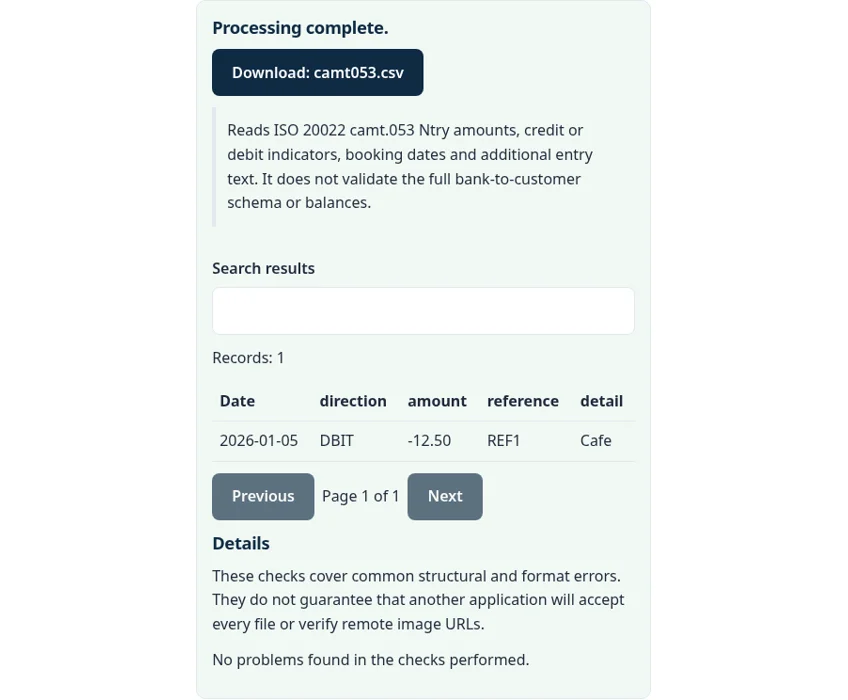
The entry becomes a row dated 2026-01-05, direction DBIT, amount -12.50, reference REF1 and detail Cafe. Amounts in camt.053 are always written as positive numbers, and the CRDT or DBIT indicator carries the direction. The converter applies that sign for you.
Reversals, currencies and batches
A reversal entry carries RvslInd set to true. Its direction is still given by CdtDbtInd, so a reversed card payment shows up as a credit, and the sign in the CSV follows that indicator. The currency attribute on Amt is not copied into a column, so keep one currency per file or note it yourself.
A batched entry, such as a salary run, can list many transactions inside NtryDtls. The camt.053 to CSV converter writes the entry total as one row rather than splitting it. Statement balances (Bal) are not rows either; use the opening and closing balances in the XML to check the CSV total.
Common camt.053 to CSV errors
- The file does not match the expected format or has invalid structure. The XML is cut off or is not well formed. Download it again.
- XML documents with DTD or entity declarations are not supported. Remove the DOCTYPE line or export again; normal bank files do not need one.
- Use a decimal amount with no currency symbol and at most two decimal places. An
Amtvalue has more than two decimals.
Privacy: your statement stays in your browser
The camt.053 to CSV converter runs with JavaScript in a background worker on this page. We checked the tool code: the statement is read from your device into browser memory, nothing is sent to a FileFix or Calcenzo server, and the only network requests the tool makes are for its own static files. Your file stays in your browser. The download is built in memory too. Bank files carry account numbers and balances, so on a shared computer clear the selection or close the tab when you are done.
Moving from SWIFT files? The MT940 to CSV converter reads the older format, and the CSV difference checker can compare an MT940 export with a camt.053 to CSV export of the same period.
Sources
The camt.053 to CSV converter follows these specifications and format guides:
- Bank of America: camt.053 and MT940 reference guide (PDF)
- Nordea: camt.053.001.02 message implementation guide (PDF)
Questions about this tool
What is a camt.053 file?
It is the ISO 20022 Bank to Customer Statement in XML. Many banks offer it as the replacement for the SWIFT MT940 statement.
Why are debit amounts negative in the CSV?
camt.053 writes every amount as a positive number and uses CdtDbtInd for direction. The converter makes DBIT amounts negative so totals work.
Which date does it use?
The booking date from BookgDt. If an entry has no booking date, the value date from ValDt is used.
Are batch details split into separate rows?
No. Each Ntry becomes one row with the entry total. Details inside NtryDtls are not split out.
Is the XML uploaded anywhere?
No. The statement is parsed in your browser and the CSV is built in memory.
Review the supported formats and limitations before using an output file. File processing happens in your browser.