
How to convert NBIB to BibTeX
Start with Try an example to inspect the fictional tagged journal record. For your own records, choose an .nbib or .txt file, drag it into the file area, or paste its tagged content into the available text input. Selecting a file starts parsing; after pasting or changing Input encoding, press Process files.
Check the preview for record count, author spelling, journal information and generated citation keys. Download references.bib for the bibliography and source-and-mapping.json for its original source and normalized fields. Save the report if your research workflow requires a comparison with the export. It contains source citation data, not a record of a live PubMed verification.
NBIB tags that matter in a journal export
PubMed citation-manager downloads use tagged records rather than ordinary reference paragraphs. Common tags include TI for title, FAU for a full author name, JT for the journal title, DP for publication date, VI for volume, IP for issue, PG for pages and AID for article identifiers. This parser supports common journal fields and folded continuation lines.
Where full author names are present, FAU is preferred over abbreviated AU values. The publication year is taken from the supported date field. An AID value marked as a DOI can be included in the bibliography. PubMed indexing details that do not map into this ordinary BibTeX journal profile remain available in the source report instead of being presented as universally preserved bibliography fields.
Worked example: a tagged journal reference
The invented record below gives Ana García as its author, the year 2024, volume 12, issue 2 and pages 10–15. Its DOI-like demonstration value is copied as provided; it is not checked against a publisher. The preview identifier is Garcia2024. The BibTeX serializer can append title words in the downloaded entry key, so read that actual exported key before writing a citation command.
PMID- 12345678
TI  - Coastal observations
FAU - García, Ana
JT  - Example Journal
DP  - 2024 Jan
VI  - 12
IP  - 2
PG  - 10-15
AID - 10.1234/example [doi]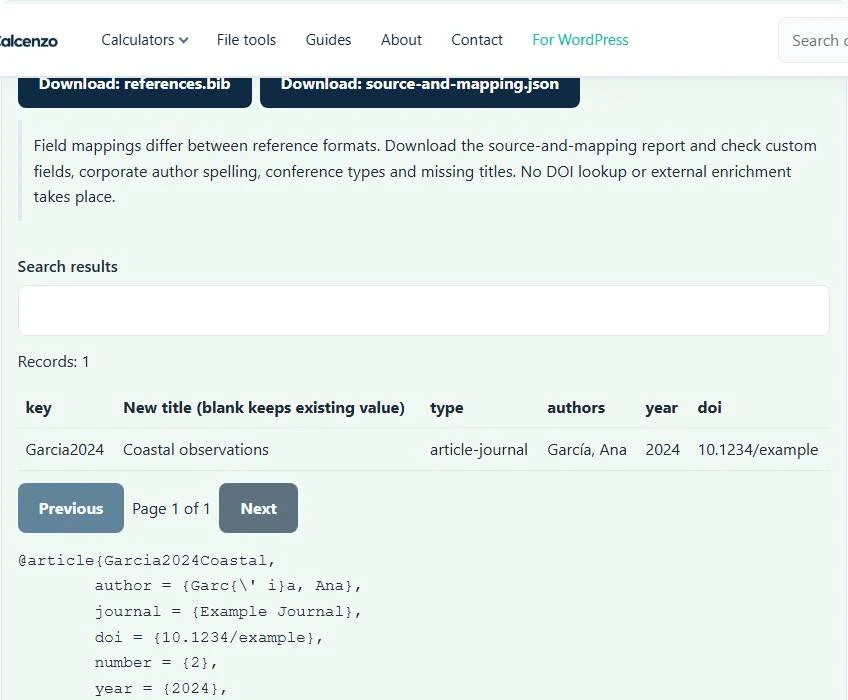
Getting the right source from PubMed
Use PubMed’s own current citation-manager export workflow to save the records you need, then bring that local file here. A copied search-result page, PMID list or formatted citation paragraph is not equivalent to an NBIB export. The PubMed user guide describes its export options; the NBIB to BibTeX converter does not connect to the service for you.
Check that your saved file includes complete records and their titles. A record with only an identifier gives too little bibliographic information for this profile. Keep blank-line record boundaries and indented continuation lines when editing or pasting. Manually flattening those structures can join two references or break a long title.
Citation keys, accents and incomplete fields
Normalized preview identifiers are derived from the first author and publication year, simplified to letters and digits, and given numeric suffixes when necessary. The bibliography serializer separately generates the exported entry keys, which may include title words. The preview identifier is not guaranteed to match the key you cite. Inspect the downloaded bibliography for key collisions and compare titles and article identifiers before merging libraries; no deduplication is performed.
Accented names should remain readable in the normalized data even when the citation key is simplified. If the source text looks corrupted, select its known encoding and process again. A missing date or abbreviated author can produce a less useful key; correct the source record rather than assuming the key proves the data is complete. The bibliography engine also limits a conversion to 10,000 records.
Use the bibliography while keeping provenance available
Add the downloaded .bib to your LaTeX project and configure that project’s bibliography system as required by its template. This page does not choose a reference style or edit your .tex file. The BibTeX formatter can inspect supported syntax and duplicate keys after you combine libraries.
If your source application exports RIS instead, use RIS to BibTeX. EndNote tagged or XML records belong in EndNote to BibTeX. These source-specific routes avoid guessing a format from a renamed extension. Keep the original NBIB and mapping report, and check the final rendered references against authoritative publication details before submitting a paper.
Common NBIB to BibTeX converter errors and how to fix them
When the NBIB to BibTeX converter cannot use a file, it stops with one clear message instead of producing a half-finished download. These are the problems people run into most often, with the fix for each. Most NBIB to BibTeX converter errors trace back to how the source file was exported, so correcting the source and running the NBIB to BibTeX converter again is usually faster than working around the message.
- The reference file could not be parsed. Check record boundaries and the selected format. The file has no MEDLINE-style tags such as PMID- and TI-. A copied citation in plain text, or an RIS file, fails here.
- The file does not match the expected format or has invalid structure. A continuation line appears before any tag. Lines that continue a field must be indented.
- A required field or column is missing. A record has no TI (title) tag.
- The file contains too many records for this browser tool. Up to 10,000 records are converted at once.
Privacy: the NBIB to BibTeX converter runs in your browser
NBIB to BibTeX converter processing happens with JavaScript in a background worker on this page. Your file is not uploaded to a FileFix server, and the results you download are created in your browser’s memory. Unpublished reading lists and draft bibliographies stay on your computer. When you finish on a shared computer, clear the selection or close the tab.
For the underlying format rules, see the NLM MEDLINE/PubMed data element descriptions and BibTeX format description. The NBIB to BibTeX converter follows the subset described on this page rather than every optional feature in those documents.
Sources
The NBIB to BibTeX follows these specifications and format guides:
Questions about this tool
Can I enter a PMID and retrieve its bibliography?
No. This converter reads a supplied NBIB or compatible tagged-text file. It does not query PubMed or fetch a record from an identifier.
Are PubMed MeSH and indexing fields copied into BibTeX?
Not all indexing fields have a supported ordinary BibTeX mapping. The original tagged source remains in the downloaded source-and-mapping report.
Does an NBIB conversion download the article PDF?
No. It converts citation records. Access to article files and publication verification are separate tasks.
Why is a full author name used instead of the initials?
This parser prefers FAU full-author values when available, falling back to AU values if needed. Inspect the resulting author spelling before citing.
Are two references with the same DOI merged automatically?
No. Deduplication is not part of this supported scope. Normalized preview identifiers are distinguished, but exported bibliography keys should still be inspected for collisions before a merge.
Review the supported formats and limitations before using an output file. File processing happens in your browser.