
How to use the RIS to BibTeX converter
Start with Try an example if you want to see a small invented journal reference before using your own library. For your records, use Choose file, drag a .ris or .txt file into the file area, or paste its tagged text into Paste text instead of choosing a file. Selecting a file starts processing; after changing an option or pasting text, press Process files.
Keep Input encoding on auto for an ordinary UTF-8 export. If names contain unexpected characters, choose the known source encoding and process again. Read the record table and the bibliography preview. Download references.bib for the destination project and source-and-mapping.json for a record of what was read and normalized. The report contains the original source, so handle it with the same care as the export.
What moves from RIS into the bibliography
RIS stores records as tagged lines: TY identifies a type, AU carries an author, TI a title, PY a publication year, and ER closes a record. The RIS to BibTeX converter uses a maintained citation parser for the supported input and BibTeX output. Common reference fields become structured bibliography data, rather than a formatted reference paragraph. The preview shows the normalized type and DOI when they were present in the source.
Conversion does not guarantee that every custom reference-manager tag has a matching BibTeX field. Notes, local attachment paths, unusual publication types and institution-specific fields deserve a comparison with the report. An attached PDF remains a separate file. Missing information stays missing: there is no DOI lookup, journal search or automatic correction of an author name.
Worked example: the preview identifier and exported citation key
The demonstration record names Ana García, gives the title Coastal observations, and supplies the year 2024. Its normalized preview identifier is Garcia2024, while the downloaded BibTeX entry uses Garcia2024Coastal. The bibliography serializer can add title words to its exported key. Use the key inside the actual downloaded entry for a citation command; the preview identifier is not an interchangeable key. The accented author name remains bibliographic data.
TY  - JOUR
AU  - García, Ana
TI  - Coastal observations
PY  - 2024
JO  - Example Journal
DO  - 10.1234/example
ER  -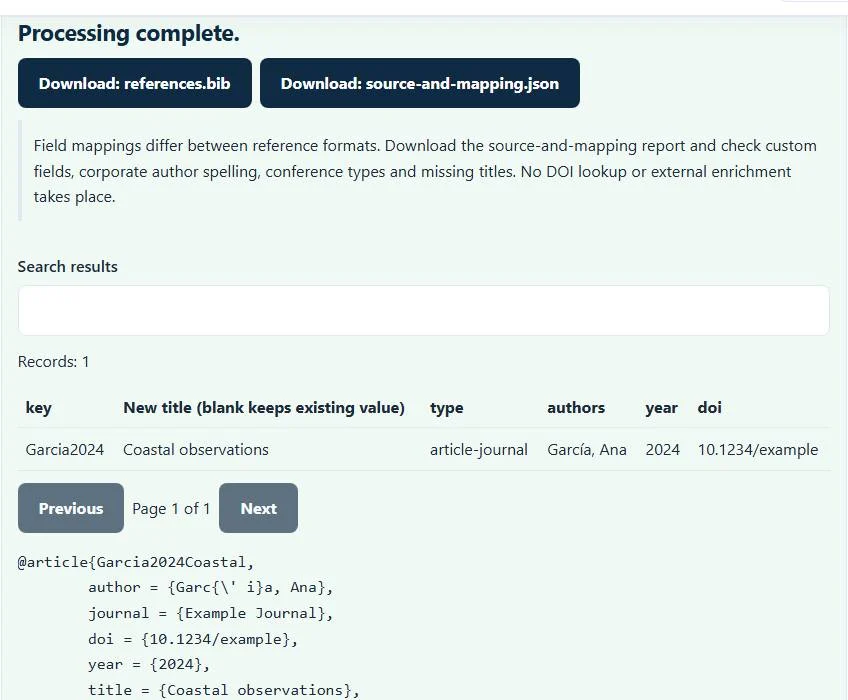
Using the .bib file in Overleaf or another LaTeX editor
Add the downloaded bibliography to your project and use its exact exported keys in your citation commands. For this sample download, the command is \cite{Garcia2024Coastal}. The key follows the opening brace of the BibTeX entry. Your project still needs its own bibliography configuration and style. A BibTeX project and a BibLaTeX project may require different packages or build steps; the RIS to BibTeX converter does not edit those settings.
If a citation appears as a question mark, first compare the command with the key in the downloaded file. Then check that the project points to the right bibliography and completes the required bibliography build. These are project issues, separate from the RIS file being readable. The Overleaf bibliography guide explains that receiving workflow.
Checks worth making before citing the result
Review corporate authors, sources without dates, conference proceedings and titles with significant capitalization. A preview identifier built from Anon or nd signals absent author or year data; it is not a verified replacement. Normalized preview identifiers receive numeric collision suffixes, but the BibTeX serializer makes its own exported keys. Inspect those downloaded keys for duplicates before merging libraries or replacing existing citation commands.
The bibliography engine accepts at most 10,000 records per conversion, and the file area shows the current site file-size limit. Split a much larger export deliberately and check key collisions before combining the outputs. Preserve the original RIS file. Clear the selected file and results when you finish on a shared computer.
Choose the source format that matches your reference export
A PubMed citation-manager file belongs in NBIB to BibTeX, rather than being renamed .ris. Existing EndNote tagged or XML exports use EndNote to BibTeX. After conversion, the BibTeX formatter can inspect bibliography syntax and duplicate keys. Use BibTeX to RIS when a collaborator needs the reverse direction. These tools change file structure; none verifies whether a cited work exists.
Common RIS to BibTeX converter errors and how to fix them
When the RIS to BibTeX converter cannot use a file, it stops with one clear message instead of producing a half-finished download. These are the problems people run into most often, with the fix for each. Most RIS to BibTeX converter errors trace back to how the source file was exported, so correcting the source and running the RIS to BibTeX converter again is usually faster than working around the message.
- The reference file could not be parsed. Check record boundaries and the selected format. Every RIS record must start with a TY tag and end with an ER line. A missing ER at the end of the file, or a renamed NBIB or EndNote export, triggers this message.
- The file contains too many records for this browser tool. One conversion accepts up to 10,000 records. Split a large library export into smaller files.
- A warning that a record has no title The record is still converted, but the entry will cite poorly. Add the title in your reference manager and export again.
- Accents or symbols look wrong That is an encoding mismatch, not a structural error. Choose the real source encoding in Input encoding and process again instead of editing the output by hand.
Privacy: the RIS to BibTeX converter runs in your browser
RIS to BibTeX converter processing happens with JavaScript in a background worker on this page. Your file is not uploaded to a FileFix server, and the results you download are created in your browser’s memory. Unpublished reading lists and draft bibliographies stay on your computer. When you finish on a shared computer, clear the selection or close the tab.
For the underlying format rules, see the BibTeX format description. The RIS to BibTeX converter follows the subset described on this page rather than every optional feature in those documents.
Sources
Questions about this tool
Does RIS to BibTeX check whether a DOI is real?
No. A DOI already present in the source can be mapped into the bibliography, but this tool does not resolve it or verify the publication.
Why did García become Garcia in the citation key?
Citation keys are simplified to ASCII letters and numbers. This key simplification does not mean the accented author name should be removed from the bibliographic data.
Will linked PDFs be included in the download?
No. The .bib output is bibliography text, and the JSON report preserves source and mapping information. Reference-manager PDF attachments are not bundled.
Are the preview identifiers the keys I should type in LaTeX?
Not necessarily. The BibTeX serializer can add title words to its exported keys. Use the key in the downloaded .bib entry and check that file for duplicate keys before merging it with a library.
Can I paste RIS instead of opening a file?
Yes. The text-paste field accepts tagged RIS content. Press Process files after pasting; nonempty pasted text takes precedence over a previously selected file.
Review the supported formats and limitations before using an output file. File processing happens in your browser.